Newsletter Archives (2)

Social Top of Funnel, Buyers Shortlist, & Keeping Your Vibes High

Remember when social media was just “top of funnel awareness”? Post content → Hope people see you → Maybe they’ll find your website → Eventually buy something

Those days are over.

My actual Instagram sales process:

  1. Create engaging content

  2. They engage and follow my call to action

  3. Call to action leads them to more of me

  4. They either book a sales call or DM me → I close

Real estate example:

  1. Post a property or engagment content

  2. Client engages

  3. Ends up on email list

  4. Still comes back to DMs to discuss logistics

  5. RE has a longer close cycle but this process keeps you on their short list.

    See below for explainer on shortlist importance. 

Why do they always end up in DMs? They want to build a relationship with who they are buying from.

Even with email lists, funnels, and fancy automation, they come back to Instagram DMs because that’s where the real conversations happen.

Instagram isn’t just awareness. It’s discovery, nurturing, AND closing.

Stop thinking 2018. Start selling 2026.

Read the full strategy →

Let me tell you about the deal you lost three months ago.


You know, the one you don’t even know about yet.


The prospect who’s currently building a mental shortlist of vendors they’ll consider when they’re ready to buy. The one who’s scrolling LinkedIn, asking peers for recommendations, and quietly evaluating who they trust.


Here’s the uncomfortable truth: by the time they reach out to you, the decision is basically already made.


The Research That Changes Everything

A study from Bain and Google (published in Harvard Business Review) found something that should make every business owner pay attention:


📊 80-90% of B2B buyers already have a shortlist of three vendors before they even begin formal research

📊 90% of purchases are ultimately made from that original “day one” list

Even more striking? Research from Wynter and Omniscient tracking 100 real B2B buying decisions shows:

📊 92% of buyers remain entirely within their initial shortlist

📊 61% of buyers already have a single preferred vendor selected before any formal evaluation begins


Translation: If you’re not on their radar early, you’re not in the running.


So How Do You Get On The Shortlist?

The research identified three key factors that put vendors on the “day one” list:

1. Previous Positive Experience They’ve worked with you, seen your work, or followed your content over time.

2. Peer Recommendations Someone they trust has mentioned you. Word-of-mouth still reigns supreme (58% of buyers say peer recommendations matter most).

3. Strong Digital Presence Your website, your content, your visibility—all of it contributes to whether you make the cut.


But here’s what the research doesn’t explicitly say (but I will):


The real differentiator is personality + a distinct point of view.

That’s what separates you from every other expert saying the same things. It’s what makes you memorable in a sea of sameness. It’s why someone remembers YOUR name when they finally decide they’re ready to buy.


What This Means For Your Business

Stop thinking about “generating leads” and start thinking about “building awareness.”


Stop optimizing for the moment someone fills out a contact form and start showing up consistently long before they know they need you.

Stop being another voice in the crowd and start having a distinct POV that people remember.


Because 97% of buyers will check out your website during their research. 78% will shortlist only 3 vendors. And if you’re not already in their awareness, you won’t make the cut.


The game isn’t won when they reach out. It’s won in the months before, when they’re quietly building their list.

The state of the world and your impact

t is safe to say the world feels heavy right now.
Most of us are carrying more than we let on.

I won’t pretend global or national events don’t affect me, they do. But I’m also aware that not every hardship lands on me in the same way it lands on others.

Over the years, I’ve learned that I don’t always need a microphone or a megaphone to live my values.

Sometimes, the most meaningful form of resistance is staying whole.
Refusing to become fragmented, hardened, or consumed by polarization.

I know this: I am no good to anyone if I allow fear, anger, or constant crisis to take me offline emotionally.

What I can do is remain available. Grounded. Compassionate. Clear.

When I’m needed, truly needed, I show up.

And when I’m not, I keep living in a way that reflects what I believe.

That’s how I protect my energy.
That’s how I stay useful.
That’s how I ensure I can make an impact when it is most needed.

I know sometimes it feels weird to keep promoting your business when some things in the world weigh us down. In truth you are supporting in the ways you can until called in another way.

So this is my encouragement that your resistance may not feel like enough but it is resistance none the less.


I’m currently offering a FREE Strategy Session. BOOK HERE!

Next newsletter, we are doing a deep dive into:

  • Instagram Trial Reels Resource Library

  • Top 4 Types of Reels for Instagram

  • Why everyone complicates viral content

Every thought is creating your reality, make sure you love what you are creating.

Leslie Lyon

p.s. If you enjoyed this, let me know.

Instagram Trial Reels, NotebookLM, LinkedIn's 2026 Algorithm

Instagram Trial Reels, NotebookLM, LinkedIn’s 2026 Algorithm

Welcome back to Market like a Lyon

February 2026 #1

This round we are covering:

  • Instagram Trial Reels Strategy: Video Tutorial

  • Testing out Notebooklm.google

  • Linkedin Algorithm


If you are curious about archived editions you can find those here.

Stop Guessing, Start Testing: The Instagram Feature That Changes Everything

What if you could test your Instagram Reels before posting them and only share the ones guaranteed to perform?

What if you could test your Instagram Reels before posting themand only share the ones guaranteed to perform?


Most creators are shooting in the dark. They post, hope, and cross their fingers. But Instagram’s hidden Trial Reels feature lets you A/B test content with real audiences before it ever hits your main feed.


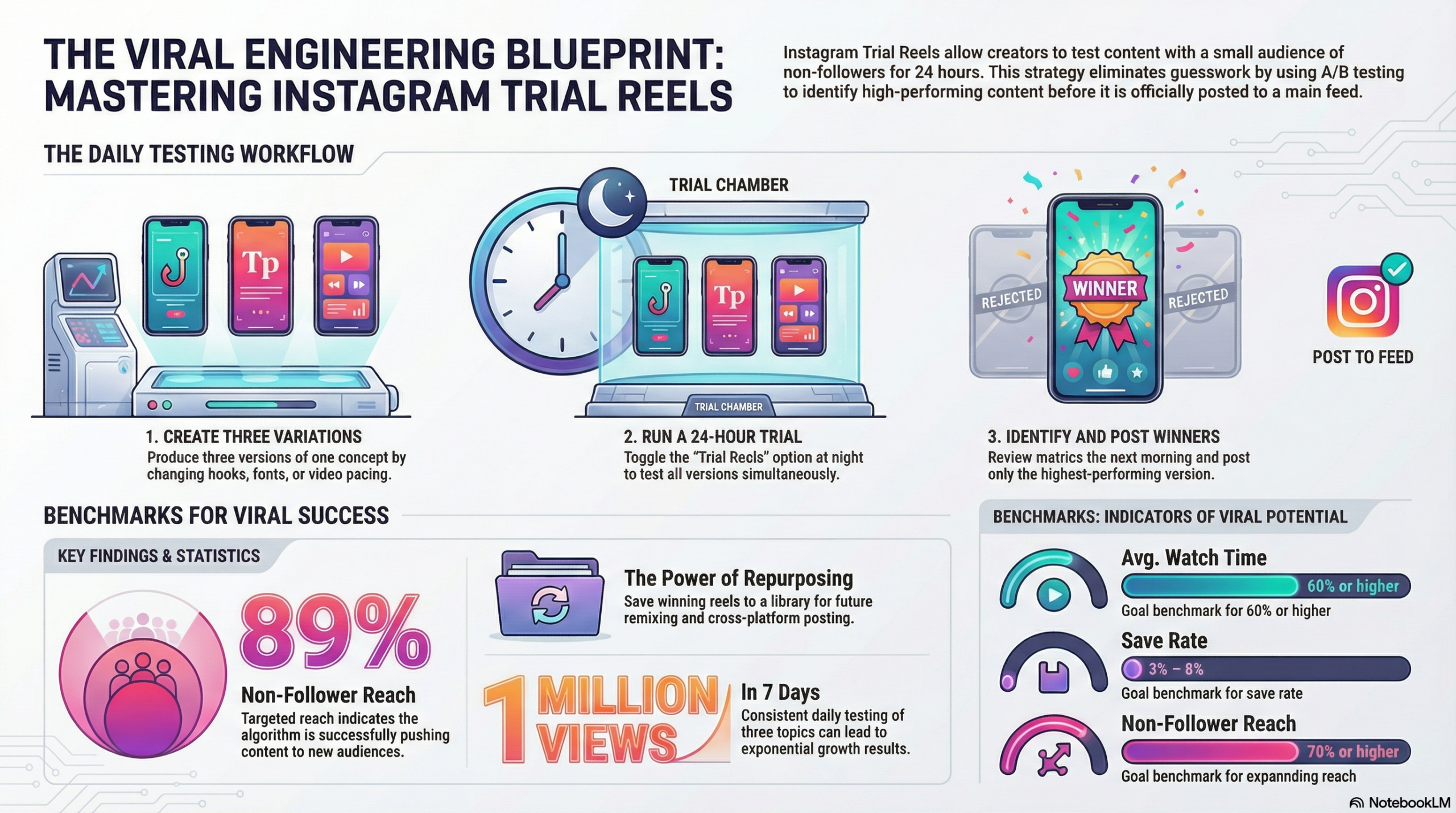
I used this exact strategy to hit 1 million views in 7 days with 89% non-follower reach. No luck. No viral accidents. Just systematic testing and data-driven decisions.


In this complete guide, I walk you through my entire process: how I create three variations of every reel, test them overnight, and only post the winners. You’ll see exactly where to find Trial Reels in your app, how to check performance metrics, and how to build a library of proven content for repurposing.


Read the full step-by-step guide →

Part 2: I tested NotebookLM and you should too!

NotebookLM

Here’s how I multiplied my content without starting from scratch 👇

I took my top 3 blog posts already ranking on Google and dropped them into googles notebooklm. 

From there, I asked for:

• A mind map

• An infographic

• A long-form YouTube video

Honestly?

It barely needed edits. The structure was solid, the message was clear, and the “meat and potatoes” were already there. Intro on the video was a touch wordy for me 😂

All I did next was:

✔️ Add a transcript

✔️ Upload it to YouTube

✔️ Done

That’s content multiplication in 2026.

Long-form content is the asset.

AI just helps you extract more value from what you’ve already created.

If you’re constantly creating new content but not repurposing what’s already working, you’re doing extra work for no reason.

Smart systems > more effort.

Has anyone else tried notebookLM yet? 👀

I would love to see what you create. Tag me!!

NotebookLM

Video Created with one click in NotebookLM

Infographics NotebookLM Pushed out from the above blog post.

The Viral Engineering Blueprint infographic showing Leslie M Lyon's Instagram Trial Reels strategy framework for mastering viral content

LinkedIn's Illusive Algorithm had a big shift in Dec and the New Year Means New Rules

LinkedIn’s Algorithm Just Changed at the end of the Year.


If you’ve noticed your LinkedIn posts getting less reach lately, you’re not alone. The platform’s 360Brew algorithm update has caused a 50% drop in views, 25% decline in engagement, and 59% decrease in follower growth across the board.


LinkedIn intentionally shifted toward quality over quantity, and the professionals who understand these changes are seeing better results than ever before.

After working with teams from multiple companies to navigate these changes, I’ve identified the clear patterns in what works and what doesn’t in 2026. 


What’s killing your reach:

  • Profile-content misalignment (posting outside your expertise)

  • Engagement bait tactics that now get penalized

  • Focusing on likes instead of saves

  • Daily posting without substance

What’s driving results:

  • Creating save-worthy frameworks and resources

  • Profile optimization that signals expertise to the AI

  • Content that keeps people reading (800-1000 words perform best)

  • Strategic relationship building over broadcast marketing

I’ve compiled everything into a comprehensive 15-minute strategy guide that covers:


✓ The real changes behind 360Brew (beyond the marketing hype)

✓ Profile optimization techniques that signal expertise

✓ Content formulas that consistently generate saves

✓ A complete 90-day implementation plan

✓ Advanced tactics for sustainable LinkedIn growth


This isn’t recycled advice or theoretical tips. These are tested strategies from hands-on experience helping businesses expand their LinkedIn reach and thought leadership.


Read the complete LinkedIn Algorithm 2026 strategy guide →


The guide includes step-by-step implementation, real examples, and practical frameworks you can start using immediately.


I’m currently offering a FREE Strategy Session. BOOK HERE!

Next newsletter, we are doing a deep dive into:

  • Instagram Top of Funnel 

  • Buyers Shortlist and how to get on it

  • The good lord only knows because marketing changes daily and I like to flow with whatever I’m working on.  

I speak to business owners daily who are worried AI is leaving them in the dust. Don’t fret those of us studying it daily and trying to keep up are also grasping to stay up to date.

It’s all working for you and in your favor even when you can’t see it,

Leslie Lyon

p.s. Thanks for reading this far.

How to Turn On Instagram Trial Reels (Step-by-Step Guide 2026)

How to Turn On Instagram Trial Reels (Step-by-Step Guide 2026)

How to Turn On Instagram Trial Reels (Step-by-Step Guide 2026)

Can’t find Instagram Trial Reels in your app? You’re not alone, here’s exactly where to look and how to enable this game-changing feature.

You’ve heard about Instagram Trial Reels and want to start testing your content before posting, but there’s one problem: you can’t find the feature anywhere in your Instagram app. Don’t worry, this is incredibly common, and there are specific reasons why the option might not be showing up.

The short answer: Instagram Trial Reels appear in the “Audience” settings when creating a new reel, but only if you meet certain prerequisites and have access to the feature in your region.

This comprehensive guide will walk you through exactly how to turn on Instagram Trial Reels, with step-by-step screenshots for both iOS and Android, plus troubleshooting solutions for when the feature isn’t appearing.

Prerequisites: What You Need Before Starting

Before diving into the step-by-step process, ensure you meet these requirements. Missing any one of these can prevent Trial Reels from appearing in your Instagram app.

Account Type Requirements: Instagram Trial Reels are primarily available to Business and Creator accounts. Personal accounts have extremely limited access to this feature, and even when available, functionality may be restricted.


📌 Update May 2026: Instagram Trial Reels require a minimum of 1,000 followers to access. If the Trial option is not showing in your Audience settings, your follower count is the first thing to check. All other steps in this guide apply once you hit that threshold.

How to check your account type:

  1. Go to your Instagram profile
  2. Tap the three lines (menu) in the top right
  3. Select “Settings and Privacy”
  4. Tap “Account type and tools”
  5. Look for “Switch to professional account” or see your current account type listed

How to switch to Business or Creator account:

  1. Follow the steps above to reach “Account type and tools”
  2. Select “Switch to professional account”
  3. Choose “Creator” for personal brands or “Business” for companies
  4. Complete the setup process (takes 2-3 minutes)

Follower Count Requirement: You must have a minimum of 1,000 followers to access Instagram Trial Reels. If your account hasn’t reached this threshold yet, the Trial option will not appear in your Audience settings regardless of your account type or app version.

App Version Requirements: Instagram Trial Reels require a recent version of the Instagram app. Older versions won’t display the feature even if your account qualifies.

For iPhone users:

  • Minimum iOS version: 12.0 or later
  • Instagram app version: 250.0 or later (check App Store for updates)

For Android users:

  • Minimum Android version: 6.0 or later
  • Instagram app version: 250.0 or later (check Google Play Store)

How to update Instagram:

  1. Open App Store (iOS) or Google Play Store (Android)
  2. Search for “Instagram”
  3. If an update is available, tap “Update”
  4. Wait for download and installation to complete
  5. Restart the Instagram app

Regional Availability: Instagram rolls out new features gradually across different regions. Trial Reels are available in most major markets, including the US, Canada, UK, Australia, and much of Europe, but some regions may still be waiting for access.

According to Meta’s developer documentation, feature rollouts can take 3-6 months to reach all global markets.

Step-by-Step Tutorial: iOS Users

Here’s exactly how to turn on Instagram Trial Reels on iPhone devices, with specific screenshots for each step.

Step 1: Open Instagram and Create New Reel

  1. Open the Instagram app on your iPhone
  2. Tap the “+” icon at the bottom center of your screen
  3. Select “Reel” from the options at the bottom
  4. Create your reel content as you normally would (video, text, effects, etc.)

Step 2: Navigate to Posting Options

  1. After editing your reel, tap “Next” in the top right corner
  2. You’ll see the standard sharing screen with caption box, tags, and location options
  3. DO NOT tap “Share” yet—we need to change the audience settings first

Step 3: Find Audience Settings

  1. Look for “Audience” in the sharing options (usually near the top)
  2. The default setting typically shows “Everyone”
  3. Tap on “Audience” to see all available options
  4. You should see options including “Everyone,” “Close Friends,” and hopefully “Trial”

Step 4: Enable Trial Reels

  1. Select “Trial” from the audience options
  2. The interface will change to show trial-specific settings
  3. You’ll see additional options related to trial duration and metrics

Step 5: Critical Step – Turn Off “Also Share On”

  1. Scroll down to find “Also share on” section
  2. You’ll see toggles for Facebook and potentially other platforms
  3. Turn OFF all “Also share on” options – this is crucial!
  4. If these remain on, your trial will post to your main feed, defeating the purpose

Step 6: Complete Trial Setup

  1. Verify “Audience” shows “Trial”
  2. Confirm all sharing options are disabled
  3. Add your caption and any relevant hashtags
  4. Tap “Share” to start your trial


Step-by-Step Tutorial: Android Users

The process for Android users is nearly identical to iOS, with minor interface differences.

Step 1: Create Your Reel

  1. Open Instagram on your Android device
  2. Tap the “+” button at the bottom center
  3. Choose “Reel” from the content type options
  4. Edit your reel with desired content, effects, and text

Step 2: Access Sharing Screen

  1. Tap “Next” after editing (top right corner)
  2. You’ll reach the sharing and caption screen
  3. Don’t tap “Share” immediately—settings need to be adjusted

Step 3: Modify Audience Settings

  1. Find “Audience” in the sharing options (typically near the top)
  2. Default setting usually displays “Everyone”
  3. Tap “Audience” to expand options
  4. Look for “Trial” among the available choices

Step 4: Activate Trial Mode

  1. Select “Trial” from the audience dropdown
  2. Interface will update to show trial-specific options
  3. Additional metrics and testing information may appear

Step 5: Disable Cross-Platform Sharing

  1. Locate “Also share on” section (scroll down if necessary)
  2. Turn OFF Facebook sharing toggle
  3. Disable any other platform sharing options that appear
  4. This step is critical – leaving these on will post to your main feed

Step 6: Launch Your Trial

  1. Double-check “Audience” displays “Trial”
  2. Verify all cross-platform sharing is disabled
  3. Complete your caption and hashtag selection
  4. Tap “Share” to begin the trial period

Verification Steps: Confirming Trial Reels Are Active

After following the setup steps, you need to verify that Trial Reels are actually working correctly.

What the Interface Should Look Like:

  • Your content should NOT appear in your main Instagram feed
  • A new “Trial Reels” section should be visible in your profile or Instagram menu
  • The audience indicator should clearly show “Trial” instead of “Everyone”

How to Check Your Active Trials:

  1. Go to your Instagram profile
  2. Look for a “Trial Reels” section (location varies by app version)
  3. Alternatively, check the Instagram menu (three lines) for “Trial Reels”
  4. Your active trials should be listed with current performance metrics

What You Should See After 24-48 Hours:

  • View count and reach statistics
  • Engagement metrics (likes, comments, saves)
  • Completion rate data
  • Audience demographic information
  • Option to promote to main feed or create new trial

Red Flags That Indicate Problems:

  • Content appears in your main Instagram feed immediately
  • Friends/followers mention seeing your “trial” content
  • No separate “Trial Reels” section appears in your profile
  • Content receives engagement from your regular followers during trial period

Troubleshooting Common Setup Issues

Even following the steps perfectly, some users encounter issues. Here are solutions to the most common problems.

Issue #1: “Trial” Option Not Appearing in Audience Settings This is the most common problem. Causes include:

  • Personal account instead of Business/Creator
  • Outdated app version
  • Regional availability limitations
  • Account restrictions or violations

Solution:

  1. Switch to Business or Creator account
  2. Update Instagram app to latest version
  3. Wait 24-48 hours for changes to take effect
  4. Contact Instagram support if problem persists

Issue #2: Trial Reels Posting to Main Feed If your trial content appears in your regular feed, you didn’t properly disable sharing options.

Solution:

  1. Delete the post immediately
  2. Recreate the reel
  3. Carefully turn OFF all “Also share on” options before posting
  4. Double-check audience settings show “Trial” only

Issue #3: No Performance Data After Trial Period Sometimes trials complete but don’t show metrics.

Solution:

  1. Check the separate “Trial Reels” section in your profile
  2. Look in Instagram menu under analytics or insights
  3. Wait up to 72 hours for data to populate
  4. Ensure you have a Business/Creator account (Personal accounts get limited data)

Issue #4: App Crashes When Enabling Trial Mode Occasional technical glitches can cause app crashes.

Solution:

  1. Force-close Instagram app completely
  2. Restart your phone
  3. Clear Instagram app cache (Android) or reinstall app (iOS)
  4. Try the process again with a shorter, simpler reel

Issue #5: Feature Works Once Then Disappears Some users can access Trial Reels initially but then lose access.

Solution: This often indicates you’re part of Instagram’s A/B testing for the feature. Unfortunately, access may be temporary. You can:

  1. Try switching between Creator and Business account types
  2. Wait for broader feature rollout
  3. Contact Instagram support to report the issue

Pro Tips for First-Time Trial Reel Users

Once you successfully enable Trial Reels, these strategies help maximize your testing effectiveness.

Start with Proven Content Types: Don’t use your first trial to test completely new content formats. Instead, create variations of content that already performs well for you. This helps you understand the feature without the variable of untested content topics.

Keep Initial Trials Short: Your first few trials should be 4-7 seconds maximum. Shorter content generates testing data faster and helps you understand the feature’s feedback loop.

Test During Peak Hours: Post your trials when your audience is most active. This ensures the test audience represents your actual followers’ engagement patterns and provides more accurate performance data.

Create Multiple Variations: Instead of testing one piece of content, create 2-3 slight variations of the same concept. Test different hooks, visual styles, or text overlays to see what resonates most with your audience.

Document Your Results: Keep track of what you test and the results. Create a simple spreadsheet noting:

  • Content type and topic
  • Hook used
  • Visual style
  • Performance metrics
  • Whether you posted to main feed
  • Final engagement if posted

Don’t Overthink the First Trial: Many users spend too much time perfecting their first trial. The goal is to learn the system, not create perfect content. Use simple, straightforward content to understand how the feature works.

What to Test First: Content Ideas for Beginners

Educational Content Variations: Create the same tip or lesson with three different approaches:

  • Question format: “Ever wonder why [topic]?”
  • Problem format: “Stop making this [topic] mistake”
  • Story format: “Here’s what I learned about [topic]”

Behind-the-Scenes Content: Test different styles of showing your work process:

  • Fast-paced time-lapse
  • Step-by-step breakdown
  • Narrated explanation of your process

Hook Testing: Take one piece of valuable content and test different opening hooks:

  • Curiosity: “The [industry] secret nobody talks about”
  • Urgency: “You’re missing out on [opportunity]”
  • Authority: “After [X years/experiences], here’s what I know”

Visual Style Testing: Use the same content with different presentation styles:

  • Heavy text overlay with minimal speaking
  • No text, all verbal explanation
  • Mix of text and speaking with visual demonstrations

Advanced Setup Optimization

Once you’re comfortable with basic Trial Reels, these advanced techniques improve your testing strategy.

Timing Strategy: Post trials 2-3 hours before your optimal posting time. This allows you to review results and post winning content during peak engagement hours.

Content Calendar Integration: Build trial testing into your regular content calendar:

  • Monday: Create and test 3 variations
  • Tuesday: Review results, post winner, create next batch
  • Wednesday: Post winner from Tuesday batch, test new content
  • Continue pattern throughout week

Audience Segmentation Testing: While you can’t control who sees trials, you can create content designed to appeal to different segments of your audience, then see which performs best:

  • Beginner vs. advanced content
  • Industry-specific vs. general topics
  • Formal vs. casual presentation style

Metrics Tracking System: Create a more sophisticated tracking system:

  • Screenshot trial metrics before posting to main feed
  • Track long-term performance of content that originated as trials
  • Note seasonal patterns in trial performance
  • Identify your highest-performing trial categories

Integration with Broader Instagram Strategy

Content Repurposing from Trials: Winning trials become valuable assets for repurposing:

  • Save high-performing trials for later reposting
  • Adapt winning formats to different topics
  • Use successful hooks in other content formats (Stories, static posts)
  • Create series based on successful trial themes

Algorithm Training: By only posting proven content to your main feed, you train Instagram’s algorithm to associate your account with high-engagement content. This can improve the performance of all your content over time.

Risk Reduction: Trial Reels eliminate the risk of posting content that could hurt your account’s algorithm performance. Poor-performing trials don’t affect your account’s standing, while poor-performing public posts can reduce future reach.

Data-Driven Content Strategy: Use trial data to inform your broader content strategy:

  • Identify your most engaging content topics
  • Understand your audience’s preferences for presentation style
  • Discover optimal content length for your audience
  • Learn which calls-to-action generate the best response

Next Steps: Building Your Trial Reels System

Week 1: Learning Phase

  • Enable Trial Reels following this guide
  • Create 3-5 trials using existing content concepts
  • Focus on understanding the interface and metrics
  • Don’t worry about perfect performance—learn the system

Week 2: Optimization Phase

  • Start testing content variations systematically
  • Compare different hooks, visual styles, and topics
  • Begin tracking results in a simple spreadsheet
  • Post your best-performing trials to main feed

Week 3: Integration Phase

  • Build Trial Reels into your regular content creation process
  • Create a sustainable testing schedule (don’t overwhelm yourself)
  • Start identifying patterns in what works for your audience
  • Begin developing templates for successful trial formats

Week 4: Scaling Phase

  • Increase your testing frequency based on your capacity
  • Start repurposing winning trial content across other platforms
  • Develop more sophisticated testing strategies
  • Consider how trial insights inform your broader marketing

Ready to Start Testing Your Instagram Content?

Instagram Trial Reels are a powerful tool for eliminating guesswork from your content strategy, but only if you can actually access and properly use the feature. By following this step-by-step guide, you should be able to successfully enable Trial Reels and begin testing your content systematically.

Remember, the goal isn’t to create perfect content immediately—it’s to learn what resonates with your audience through real data rather than assumptions.

Want professional help with your Instagram strategy? Contact our team to discuss how we can help you implement systematic content testing and data-driven growth strategies for your business.

Frequently Asked Questions About Instagram Trial Reels

Do you need 1,000 followers to use Instagram Trial Reels? Yes. Instagram requires a minimum of 1,000 followers to access the Trial Reels feature. Even if you have a Business or Creator account with the latest app version, the Trial option will not appear in your Audience settings until your account reaches this threshold.

Why can’t I find the Trial option in my Audience settings? The most common reasons are: your account is under 1,000 followers, you’re using a personal account instead of a Business or Creator account, your app version is outdated, or Trial Reels haven’t rolled out to your region yet. Work through each prerequisite in order before assuming the feature isn’t available to you.

Do Trial Reels show up on your profile or main feed? No. Trial Reels are shown to non-followers only and do not appear on your main profile grid or in your followers’ feeds. This is the entire point of the feature — you can test content without it affecting your existing audience or account performance.

How long does an Instagram Trial Reel run? Trial Reels run for up to 30 days. The first 72 hours are the most important. Within that window, Instagram shows your content to non-followers and provides performance data. You can choose to promote a trial to your main feed at any point, or simply let it expire.

Can you run multiple Trial Reels at the same time? Yes. Instagram allows you to run multiple trials simultaneously, which makes it possible to test different content types, hooks, or formats at the same time and compare results directly.

What metrics can you see from a Trial Reel? You can view reach, views, likes, comments, saves, and shares from your trial period. These metrics help you determine whether content is worth posting to your main feed before it ever touches your regular audience.

Will a Trial Reel hurt your account if it performs poorly? No. Poor performance during a trial does not negatively impact your account’s algorithm standing. That’s the primary advantage of using trials — only content that has already proven itself gets posted to your main feed.

Can personal accounts use Instagram Trial Reels? Personal accounts have extremely limited access to Trial Reels, and functionality is restricted even when available. To fully use the feature, switch to a Business or Creator account through your account settings.

What should you do if your Trial Reel accidentally posted to your main feed? Delete it immediately. This happens when the “Also share on” toggles are left on before posting. Recreate the reel, turn off all cross-platform sharing options, and confirm your Audience setting shows “Trial” before tapping Share.

How do you know when a Trial Reel is ready to post to your main feed? Instagram will notify you when your trial has enough data to evaluate. As a general benchmark, strong completion rates, save rates above 5%, and profile visits are positive signals that the content is worth sharing with your full audience.