📌 See the entire Instagram Trial Reels Resource Library
📌 Quick Definition:
Instagram Trial Reels are a testing feature that shows your Reel to non-followers first for 24 hours. Based on engagement metrics, Instagram decides whether to push your Reel to a wider audience or limit its reach.
Already know how Trial Reels work? Check out our [complete step-by-step video guide →]
How to Use Trial Reels to Hit 1 Million Views and 89% Non-Follower Reach in 7 Days
At Leslie M Lyon for our own content and for our customers we consistently have viral content.
This is not a one time thing. Leslie M Lyon has consistently generated viral frameworks for our brand and our clients.
Posting content on Instagram and hoping it performs is a gamble. What if you could test your content before it goes live and only post what you know will work?
That’s exactly what Instagram trial reels let you do. And it’s the strategy I used to hit 1 million views with 89% of those views coming from people who don’t follow me. All in 7 days.
This isn’t about luck or going viral by accident. This is a systematic approach to content testing that removes guesswork and maximizes reach.
Here’s the exact process.
If you are needing support on why trends are important in 2026 check that out here.
What Are Instagram Trial Reels?
Trial reels are Instagram’s built-in A/B testing feature. When you post a reel, you can toggle on “trial reels” before publishing. Instagram will show your reel to a small test audience first and give you performance data before it goes live to your full audience.
This is Instagram literally giving you free content testing. Most creators don’t use it. That’s their mistake. For more information, check out Instagram’s official Creator Center.
The Trial Reels Strategy: How I Hit 1 Million Views in 7 Days
Here’s what most people do: Create one reel, post it, hope it works, feel disappointed when it doesn’t, repeat.
Here’s what I do: Create three variations of the same reel concept, test them all using trial reels, then post only the winner.
Step 1: Create Three Variations of Each Instagram Reel
I create three different versions of the same core concept every single day. The topic stays the same, but the execution changes.
What I change between variations:
- The hook or text overlay
- The font style and color
- The b-roll footage
- The starting point or length of the video clip
- The pacing of cuts and transitions
This works for both b-roll reels and talking head videos. The message is consistent. The presentation has three different angles.
Example: If my reel topic is “3 mistakes new real estate investors make,” I create:
- Version A: Bold sans-serif font, opens with mistake #1, fast cuts
- Version B: Script font, opens with hook “You’re losing money and don’t even know it,” slower pacing
- Version C: Different b-roll footage, same script, medium pacing with different starting clip
Each version tests a different hypothesis about what will grab attention and hold viewers.
Step 2: Post All Three Variations to Trial Reels the Night Before
Every night, I post all three variations of each reel topic to trial reels. If I’m creating content around three different topics per day, that’s 9 total videos being tested (3 topics x 3 variations each).
How to use trial reels:
- Create your reel as normal in Instagram
- Before you hit “Share,” toggle on the “trial reel” option
- Post it
Instagram will show your trial reel to a smaller test audience and track performance metrics. You’ll get data on views, completion rate, engagement, and more.
This is how you let your audience tell you what works instead of guessing.
Step 3: Check Trial Reels Performance the Next Day
The next morning, I review which version of each reel performed best. I’m looking at:
- View count: Which got the most eyeballs?
- Completion rate: Which one did people watch all the way through?
- Engagement: Which got the most saves, shares, and comments?
Out of each set of three variations, one always performs better than the others. That’s the version I post to my main feed.
Step 4: Post the Winning Instagram Reels from Your Drafts
Once I know which reel won the test, I go back into my drafts and post that winning version to my main Instagram feed.
At this stage, I also cross-post to Facebook. (I’m currently testing whether cross-posting helps or hurts individual post performance, and I’ll update on those findings.)
The key here is that I’m not posting blind. I’m posting content that already proved it resonates with an audience.
Step 5: Save Winning Reels to Your Content Repurposing Library
This is the step most people skip, and it’s critical for long-term content success.
Every winning reel gets added to my video repurposing folder in Google Drive. This creates a library of proven, high-performing content that I can remix, repurpose, or recreate later.
If you have a team member managing content, this is invaluable. They’re not guessing what to create. They’re working from a folder of content that already delivered results.
What to save:
- The video file
- The caption
- Performance metrics
- Notes on what made it work
This becomes your content gold mine.
Step 6: Repeat the Trial Reels Process Daily
I did this every single day for 7 days straight:
- Three topics per day
- Three variations of each topic
- Test all nine in trial reels
- Post the three winners the next day
- Save winners to the repurposing library
- Move on to the next day
No overthinking. No perfectionism. Just testing, data, and execution.
Step 7: Double Down on Instagram Reels That Go Viral
During that 7-day period, three of my reels went viral. When I saw one taking off, I didn’t just celebrate and move on.
I remixed it. I created new variations with slight tweaks and posted them again.
If something works, milk it:
- Change the hook and repost
- Use different footage with the same message
- Create a “part 2” that builds on the viral reel
- Repurpose the concept for a different platform
One viral reel can become five more high-performing pieces of content if you’re strategic about it.
The Results: 1 Million Views and 89% Non-Follower Reach
By following this trial reels strategy for 7 days straight, here’s what happened:
1 million total views across all posted reels 89% of those views came from non-followers
That second stat is the most important one. The Instagram algorithm pushed my content to new audiences because I gave it content that was already proven to perform well.
I wasn’t hoping for reach. I was engineering it.
Why the Trial Reels Strategy Works
Trial reels eliminate guesswork. You’re not crossing your fingers and hoping your content resonates. You’re testing it with real data before committing to a full post.
Here’s why this approach is so effective:
- You learn what your audience actually wants Not what you think they want. What the data proves they want.
- You only invest energy in winners Why waste time promoting content that’s already underperforming? Post what works and move on.
- You build a library of proven content Every winner goes into your repurposing vault. Over time, you have dozens of high-performing assets to remix and reuse.
- You train the algorithm to push your content When Instagram sees that your content consistently performs well in tests, it rewards you with more reach on future posts.
How to Start Using Trial Reels Today
Ready to implement this Instagram trial reels strategy? Here’s your action plan:
Week 1:
- Choose 3 content topics relevant to your audience
- Create 3 variations of each (9 videos total)
- Post all 9 to trial reels over 3 days
- Track which variations perform best
Week 2:
- Post the winning variations to your main feed
- Start building your content repurposing library
- Analyze what patterns emerge (do certain hooks work better? specific footage styles?)
Week 3 and beyond:
- Make this your standard content creation process
- Refine your variations based on what you’ve learned
- Scale up to more topics per week as you get comfortable with the workflow
Trial Reels Strategy: The Bottom Line
If you’re not using Instagram trial reels, you’re guessing what will work. If you’re guessing, you’re losing opportunities for reach and growth.
Start testing. Post the winners. Build your repurposing library. Repeat.
This is how you scale reach without scaling effort. This is how you go from hoping your content works to knowing it will.
Repurposing your content with SEO optimization built in is one of the best ways to keep your content by being indexed from all platforms like Pinterest, Youtube, and Tiktok.
Frequently Asked Questions About Instagram Trial Reels Strategy
What makes a Trial Reel perform well?
High-performing Trial Reels typically have three things in common: a strong hook in the first 1-2 seconds that stops scrolling, content that delivers on the hook’s promise, and a format that encourages saves or shares (tutorials, tips, relatable humor). Instagram’s algorithm during the trial period heavily weights watch time and save rate.
How do I know if my Trial Reel is performing well?
Check your Insights 3-6 hours after posting. Look for: 60%+ average watch time, 3-5%+ save rate, 5-10%+ share rate, and 70%+ non-follower reach. If you’re hitting these benchmarks during the trial period, your Reel is likely to get pushed to a larger audience after 24 hours.
Should I post Trial Reels at specific times?
Post Trial Reels during your audience’s most active hours for maximum initial engagement during the test period. However, since Trial Reels prioritize non-followers, your usual “best posting time” may matter less. Test different posting times and track which ones yield the strongest 24-hour trial performance.
Can I use trending audio on Trial Reels?
Yes, and you should. Trending audio increases your chances of appearing on Explore pages and in non-follower feeds. During the trial period, Instagram is testing whether your content resonates with broader audiences—trending audio helps you reach those audiences more effectively.
What types of content work best for Trial Reels?
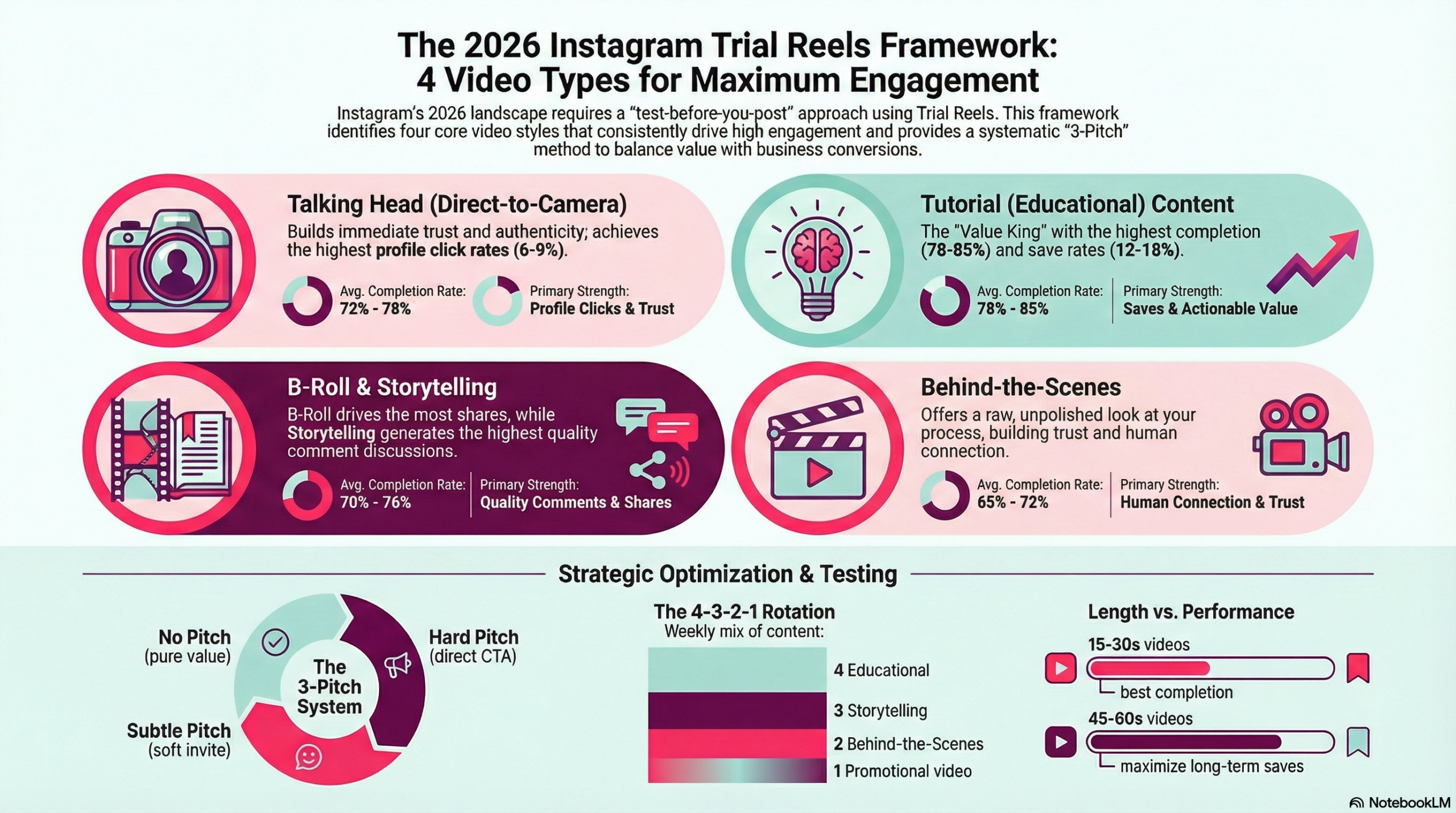
Educational content (tutorials, tips, how-tos), value-driven posts (list-style content, “things I wish I knew”), and highly relatable content (common pain points, humor) tend to perform best. These formats naturally encourage saves and shares, which are weighted heavily during the trial period.
How is non-follower reach calculated for Trial Reels?
Non-follower reach is the percentage of people who saw your Reel who don’t follow you. For Trial Reels, you’re aiming for 70-90%+ non-follower reach, which indicates Instagram is successfully testing your content with new audiences. You can find this metric in your Instagram Insights under the specific Reel’s analytics.
Should I respond to comments during the trial period?
Yes, absolutely. Engagement signals (including comment responses) tell Instagram your content is sparking conversation. Respond to comments quickly during the 24-hour trial period to boost engagement metrics and increase the likelihood Instagram pushes your Reel wider.
Can I edit a Trial Reel after posting?
No, you cannot edit a Reel after it’s published (whether it’s a Trial Reel or regular Reel). You can only delete it and repost with corrections. Make sure your content is polished before hitting publish on a Trial Reel.
What’s a good save rate for Trial Reels?
Aim for 3-5% or higher. A save rate means people found your content valuable enough to reference later. Instagram interprets high save rates as a strong quality signal. Content like tutorials, templates, and resource lists naturally earn higher save rates.
Why did my Trial Reel stop getting views after 24 hours?
If your Trial Reel had weak engagement during the test period (low watch time, few saves/shares), Instagram decided not to push it to a wider audience. This is the feature working as intended—it prevented a low-performer from taking up valuable distribution. Use the data to improve your next Reel.
Can I use hashtags on Trial Reels?
Yes, use 3-5 highly relevant hashtags. However, during the trial period, Instagram is primarily testing your content with non-followers through algorithmic distribution rather than hashtag discovery. Hashtags still matter, but content quality and engagement metrics matter more for Trial Reels.
How do Trial Reels affect the Instagram algorithm long-term?
Trial Reels help you identify high-quality content before committing to full distribution. By consistently posting Trial Reels that perform well, you’re training Instagram’s algorithm to recognize your content as valuable, which can improve your overall account reach over time.
Should I archive poorly performing Trial Reels?
Many creators delete or archive Trial Reels that performed poorly during the test period. Since the Reel won’t get significant reach anyway, removing it keeps your profile clean and prevents low-performing content from sitting in your grid. However, keep the analytics data for learning purposes.
Can Trial Reels go viral?
Yes. If your Trial Reel performs exceptionally well during the 24-hour test period, Instagram will push it to a massive audience, often resulting in viral reach (millions of views). The 1 million view example in this post came from a Trial Reel that showed strong early engagement signals.
What’s the ideal length for a Trial Reel?
Keep Trial Reels between 7-15 seconds when possible. Shorter Reels have higher completion rates, which boosts your average watch time percentage—a key metric Instagram tracks during the trial period. Only go longer if the content absolutely requires it.
Do I need a large following to use Trial Reels effectively?
No. Trial Reels are designed to test content with non-followers, so your existing follower count matters less. Small accounts can achieve massive reach through Trial Reels if the content resonates with new audiences. This levels the playing field for newer creators.
Can I cross-post Trial Reels to other platforms?
Yes, but wait until after the 24-hour trial period. You want Instagram’s algorithm to have accurate data about how your content performs natively on Instagram. After the trial period, feel free to repurpose high-performing Trial Reels on TikTok, YouTube Shorts, or other platforms.
How often should I use Trial Reels vs regular Reels?
Use Trial Reels for 50-70% of your content, especially when testing new formats, topics, or styles. Reserve regular Reels for time-sensitive content or posts where you want immediate distribution to your existing followers. Trial Reels are best for evergreen, high-quality content you want to maximize reach on.
What if my Trial Reel performs well but I want to delete it anyway?
If a Trial Reel performed well during testing, Instagram will likely continue pushing it to larger audiences. Deleting it means losing that momentum and reach. However, if there’s a compelling reason to remove it (error, outdated info), you can delete it at any time.
Can I see examples of successful Trial Reels from other creators?
Instagram doesn’t publicly label which Reels were tested as Trial Reels. However, you can identify likely Trial Reels by looking for posts from smaller creators that suddenly got massive reach (1M+ views with only 10K followers). These often started as Trial Reels that performed exceptionally during testing.
How do you get Instagram Trial Reels?
To get Instagram Trial Reels, make sure your app is updated to the latest version. When creating a Reel, tap “Advanced Settings” before publishing and toggle on the “Trial” option. If you don’t see it yet, your account may not have the feature – keep updating the app as Instagram is still rolling it out. Business and Creator accounts tend to get access first.
How many Trial Reels can I post a day?
Instagram doesn’t publish an official daily limit for Trial Reels. In practice, 3-9 per day is manageable and effective for testing. At Leslie M Lyon, we test 9 Trial Reels per day (3 topics x 3 variations each) as our standard content testing process. Quality over quantity – each variation should test a specific hypothesis about hooks, pacing, or format.