How to Turn On Instagram Trial Reels (Step-by-Step Guide 2026)

How to Turn On Instagram Trial Reels (Step-by-Step Guide 2026)

How to Turn On Instagram Trial Reels (Step-by-Step Guide 2026)

Can’t find Instagram Trial Reels in your app? You’re not alone, here’s exactly where to look and how to enable this game-changing feature.

You’ve heard about Instagram Trial Reels and want to start testing your content before posting, but there’s one problem: you can’t find the feature anywhere in your Instagram app. Don’t worry, this is incredibly common, and there are specific reasons why the option might not be showing up.

The short answer: Instagram Trial Reels appear in the “Audience” settings when creating a new reel, but only if you meet certain prerequisites and have access to the feature in your region.

This comprehensive guide will walk you through exactly how to turn on Instagram Trial Reels, with step-by-step screenshots for both iOS and Android, plus troubleshooting solutions for when the feature isn’t appearing.

Prerequisites: What You Need Before Starting

Before diving into the step-by-step process, ensure you meet these requirements. Missing any one of these can prevent Trial Reels from appearing in your Instagram app.

Account Type Requirements: Instagram Trial Reels are primarily available to Business and Creator accounts. Personal accounts have extremely limited access to this feature, and even when available, functionality may be restricted.


📌 Update May 2026: Instagram Trial Reels require a minimum of 1,000 followers to access. If the Trial option is not showing in your Audience settings, your follower count is the first thing to check. All other steps in this guide apply once you hit that threshold.

How to check your account type:

  1. Go to your Instagram profile
  2. Tap the three lines (menu) in the top right
  3. Select “Settings and Privacy”
  4. Tap “Account type and tools”
  5. Look for “Switch to professional account” or see your current account type listed

How to switch to Business or Creator account:

  1. Follow the steps above to reach “Account type and tools”
  2. Select “Switch to professional account”
  3. Choose “Creator” for personal brands or “Business” for companies
  4. Complete the setup process (takes 2-3 minutes)

Follower Count Requirement: You must have a minimum of 1,000 followers to access Instagram Trial Reels. If your account hasn’t reached this threshold yet, the Trial option will not appear in your Audience settings regardless of your account type or app version.

App Version Requirements: Instagram Trial Reels require a recent version of the Instagram app. Older versions won’t display the feature even if your account qualifies.

For iPhone users:

  • Minimum iOS version: 12.0 or later
  • Instagram app version: 250.0 or later (check App Store for updates)

For Android users:

  • Minimum Android version: 6.0 or later
  • Instagram app version: 250.0 or later (check Google Play Store)

How to update Instagram:

  1. Open App Store (iOS) or Google Play Store (Android)
  2. Search for “Instagram”
  3. If an update is available, tap “Update”
  4. Wait for download and installation to complete
  5. Restart the Instagram app

Regional Availability: Instagram rolls out new features gradually across different regions. Trial Reels are available in most major markets, including the US, Canada, UK, Australia, and much of Europe, but some regions may still be waiting for access.

According to Meta’s developer documentation, feature rollouts can take 3-6 months to reach all global markets.

Step-by-Step Tutorial: iOS Users

Here’s exactly how to turn on Instagram Trial Reels on iPhone devices, with specific screenshots for each step.

Step 1: Open Instagram and Create New Reel

  1. Open the Instagram app on your iPhone
  2. Tap the “+” icon at the bottom center of your screen
  3. Select “Reel” from the options at the bottom
  4. Create your reel content as you normally would (video, text, effects, etc.)

Step 2: Navigate to Posting Options

  1. After editing your reel, tap “Next” in the top right corner
  2. You’ll see the standard sharing screen with caption box, tags, and location options
  3. DO NOT tap “Share” yet—we need to change the audience settings first

Step 3: Find Audience Settings

  1. Look for “Audience” in the sharing options (usually near the top)
  2. The default setting typically shows “Everyone”
  3. Tap on “Audience” to see all available options
  4. You should see options including “Everyone,” “Close Friends,” and hopefully “Trial”

Step 4: Enable Trial Reels

  1. Select “Trial” from the audience options
  2. The interface will change to show trial-specific settings
  3. You’ll see additional options related to trial duration and metrics

Step 5: Critical Step – Turn Off “Also Share On”

  1. Scroll down to find “Also share on” section
  2. You’ll see toggles for Facebook and potentially other platforms
  3. Turn OFF all “Also share on” options – this is crucial!
  4. If these remain on, your trial will post to your main feed, defeating the purpose

Step 6: Complete Trial Setup

  1. Verify “Audience” shows “Trial”
  2. Confirm all sharing options are disabled
  3. Add your caption and any relevant hashtags
  4. Tap “Share” to start your trial


Step-by-Step Tutorial: Android Users

The process for Android users is nearly identical to iOS, with minor interface differences.

Step 1: Create Your Reel

  1. Open Instagram on your Android device
  2. Tap the “+” button at the bottom center
  3. Choose “Reel” from the content type options
  4. Edit your reel with desired content, effects, and text

Step 2: Access Sharing Screen

  1. Tap “Next” after editing (top right corner)
  2. You’ll reach the sharing and caption screen
  3. Don’t tap “Share” immediately—settings need to be adjusted

Step 3: Modify Audience Settings

  1. Find “Audience” in the sharing options (typically near the top)
  2. Default setting usually displays “Everyone”
  3. Tap “Audience” to expand options
  4. Look for “Trial” among the available choices

Step 4: Activate Trial Mode

  1. Select “Trial” from the audience dropdown
  2. Interface will update to show trial-specific options
  3. Additional metrics and testing information may appear

Step 5: Disable Cross-Platform Sharing

  1. Locate “Also share on” section (scroll down if necessary)
  2. Turn OFF Facebook sharing toggle
  3. Disable any other platform sharing options that appear
  4. This step is critical – leaving these on will post to your main feed

Step 6: Launch Your Trial

  1. Double-check “Audience” displays “Trial”
  2. Verify all cross-platform sharing is disabled
  3. Complete your caption and hashtag selection
  4. Tap “Share” to begin the trial period

Verification Steps: Confirming Trial Reels Are Active

After following the setup steps, you need to verify that Trial Reels are actually working correctly.

What the Interface Should Look Like:

  • Your content should NOT appear in your main Instagram feed
  • A new “Trial Reels” section should be visible in your profile or Instagram menu
  • The audience indicator should clearly show “Trial” instead of “Everyone”

How to Check Your Active Trials:

  1. Go to your Instagram profile
  2. Look for a “Trial Reels” section (location varies by app version)
  3. Alternatively, check the Instagram menu (three lines) for “Trial Reels”
  4. Your active trials should be listed with current performance metrics

What You Should See After 24-48 Hours:

  • View count and reach statistics
  • Engagement metrics (likes, comments, saves)
  • Completion rate data
  • Audience demographic information
  • Option to promote to main feed or create new trial

Red Flags That Indicate Problems:

  • Content appears in your main Instagram feed immediately
  • Friends/followers mention seeing your “trial” content
  • No separate “Trial Reels” section appears in your profile
  • Content receives engagement from your regular followers during trial period

Troubleshooting Common Setup Issues

Even following the steps perfectly, some users encounter issues. Here are solutions to the most common problems.

Issue #1: “Trial” Option Not Appearing in Audience Settings This is the most common problem. Causes include:

  • Personal account instead of Business/Creator
  • Outdated app version
  • Regional availability limitations
  • Account restrictions or violations

Solution:

  1. Switch to Business or Creator account
  2. Update Instagram app to latest version
  3. Wait 24-48 hours for changes to take effect
  4. Contact Instagram support if problem persists

Issue #2: Trial Reels Posting to Main Feed If your trial content appears in your regular feed, you didn’t properly disable sharing options.

Solution:

  1. Delete the post immediately
  2. Recreate the reel
  3. Carefully turn OFF all “Also share on” options before posting
  4. Double-check audience settings show “Trial” only

Issue #3: No Performance Data After Trial Period Sometimes trials complete but don’t show metrics.

Solution:

  1. Check the separate “Trial Reels” section in your profile
  2. Look in Instagram menu under analytics or insights
  3. Wait up to 72 hours for data to populate
  4. Ensure you have a Business/Creator account (Personal accounts get limited data)

Issue #4: App Crashes When Enabling Trial Mode Occasional technical glitches can cause app crashes.

Solution:

  1. Force-close Instagram app completely
  2. Restart your phone
  3. Clear Instagram app cache (Android) or reinstall app (iOS)
  4. Try the process again with a shorter, simpler reel

Issue #5: Feature Works Once Then Disappears Some users can access Trial Reels initially but then lose access.

Solution: This often indicates you’re part of Instagram’s A/B testing for the feature. Unfortunately, access may be temporary. You can:

  1. Try switching between Creator and Business account types
  2. Wait for broader feature rollout
  3. Contact Instagram support to report the issue

Pro Tips for First-Time Trial Reel Users

Once you successfully enable Trial Reels, these strategies help maximize your testing effectiveness.

Start with Proven Content Types: Don’t use your first trial to test completely new content formats. Instead, create variations of content that already performs well for you. This helps you understand the feature without the variable of untested content topics.

Keep Initial Trials Short: Your first few trials should be 4-7 seconds maximum. Shorter content generates testing data faster and helps you understand the feature’s feedback loop.

Test During Peak Hours: Post your trials when your audience is most active. This ensures the test audience represents your actual followers’ engagement patterns and provides more accurate performance data.

Create Multiple Variations: Instead of testing one piece of content, create 2-3 slight variations of the same concept. Test different hooks, visual styles, or text overlays to see what resonates most with your audience.

Document Your Results: Keep track of what you test and the results. Create a simple spreadsheet noting:

  • Content type and topic
  • Hook used
  • Visual style
  • Performance metrics
  • Whether you posted to main feed
  • Final engagement if posted

Don’t Overthink the First Trial: Many users spend too much time perfecting their first trial. The goal is to learn the system, not create perfect content. Use simple, straightforward content to understand how the feature works.

What to Test First: Content Ideas for Beginners

Educational Content Variations: Create the same tip or lesson with three different approaches:

  • Question format: “Ever wonder why [topic]?”
  • Problem format: “Stop making this [topic] mistake”
  • Story format: “Here’s what I learned about [topic]”

Behind-the-Scenes Content: Test different styles of showing your work process:

  • Fast-paced time-lapse
  • Step-by-step breakdown
  • Narrated explanation of your process

Hook Testing: Take one piece of valuable content and test different opening hooks:

  • Curiosity: “The [industry] secret nobody talks about”
  • Urgency: “You’re missing out on [opportunity]”
  • Authority: “After [X years/experiences], here’s what I know”

Visual Style Testing: Use the same content with different presentation styles:

  • Heavy text overlay with minimal speaking
  • No text, all verbal explanation
  • Mix of text and speaking with visual demonstrations

Advanced Setup Optimization

Once you’re comfortable with basic Trial Reels, these advanced techniques improve your testing strategy.

Timing Strategy: Post trials 2-3 hours before your optimal posting time. This allows you to review results and post winning content during peak engagement hours.

Content Calendar Integration: Build trial testing into your regular content calendar:

  • Monday: Create and test 3 variations
  • Tuesday: Review results, post winner, create next batch
  • Wednesday: Post winner from Tuesday batch, test new content
  • Continue pattern throughout week

Audience Segmentation Testing: While you can’t control who sees trials, you can create content designed to appeal to different segments of your audience, then see which performs best:

  • Beginner vs. advanced content
  • Industry-specific vs. general topics
  • Formal vs. casual presentation style

Metrics Tracking System: Create a more sophisticated tracking system:

  • Screenshot trial metrics before posting to main feed
  • Track long-term performance of content that originated as trials
  • Note seasonal patterns in trial performance
  • Identify your highest-performing trial categories

Integration with Broader Instagram Strategy

Content Repurposing from Trials: Winning trials become valuable assets for repurposing:

  • Save high-performing trials for later reposting
  • Adapt winning formats to different topics
  • Use successful hooks in other content formats (Stories, static posts)
  • Create series based on successful trial themes

Algorithm Training: By only posting proven content to your main feed, you train Instagram’s algorithm to associate your account with high-engagement content. This can improve the performance of all your content over time.

Risk Reduction: Trial Reels eliminate the risk of posting content that could hurt your account’s algorithm performance. Poor-performing trials don’t affect your account’s standing, while poor-performing public posts can reduce future reach.

Data-Driven Content Strategy: Use trial data to inform your broader content strategy:

  • Identify your most engaging content topics
  • Understand your audience’s preferences for presentation style
  • Discover optimal content length for your audience
  • Learn which calls-to-action generate the best response

Next Steps: Building Your Trial Reels System

Week 1: Learning Phase

  • Enable Trial Reels following this guide
  • Create 3-5 trials using existing content concepts
  • Focus on understanding the interface and metrics
  • Don’t worry about perfect performance—learn the system

Week 2: Optimization Phase

  • Start testing content variations systematically
  • Compare different hooks, visual styles, and topics
  • Begin tracking results in a simple spreadsheet
  • Post your best-performing trials to main feed

Week 3: Integration Phase

  • Build Trial Reels into your regular content creation process
  • Create a sustainable testing schedule (don’t overwhelm yourself)
  • Start identifying patterns in what works for your audience
  • Begin developing templates for successful trial formats

Week 4: Scaling Phase

  • Increase your testing frequency based on your capacity
  • Start repurposing winning trial content across other platforms
  • Develop more sophisticated testing strategies
  • Consider how trial insights inform your broader marketing

Ready to Start Testing Your Instagram Content?

Instagram Trial Reels are a powerful tool for eliminating guesswork from your content strategy, but only if you can actually access and properly use the feature. By following this step-by-step guide, you should be able to successfully enable Trial Reels and begin testing your content systematically.

Remember, the goal isn’t to create perfect content immediately—it’s to learn what resonates with your audience through real data rather than assumptions.

Want professional help with your Instagram strategy? Contact our team to discuss how we can help you implement systematic content testing and data-driven growth strategies for your business.

Frequently Asked Questions About Instagram Trial Reels

Do you need 1,000 followers to use Instagram Trial Reels? Yes. Instagram requires a minimum of 1,000 followers to access the Trial Reels feature. Even if you have a Business or Creator account with the latest app version, the Trial option will not appear in your Audience settings until your account reaches this threshold.

Why can’t I find the Trial option in my Audience settings? The most common reasons are: your account is under 1,000 followers, you’re using a personal account instead of a Business or Creator account, your app version is outdated, or Trial Reels haven’t rolled out to your region yet. Work through each prerequisite in order before assuming the feature isn’t available to you.

Do Trial Reels show up on your profile or main feed? No. Trial Reels are shown to non-followers only and do not appear on your main profile grid or in your followers’ feeds. This is the entire point of the feature — you can test content without it affecting your existing audience or account performance.

How long does an Instagram Trial Reel run? Trial Reels run for up to 30 days. The first 72 hours are the most important. Within that window, Instagram shows your content to non-followers and provides performance data. You can choose to promote a trial to your main feed at any point, or simply let it expire.

Can you run multiple Trial Reels at the same time? Yes. Instagram allows you to run multiple trials simultaneously, which makes it possible to test different content types, hooks, or formats at the same time and compare results directly.

What metrics can you see from a Trial Reel? You can view reach, views, likes, comments, saves, and shares from your trial period. These metrics help you determine whether content is worth posting to your main feed before it ever touches your regular audience.

Will a Trial Reel hurt your account if it performs poorly? No. Poor performance during a trial does not negatively impact your account’s algorithm standing. That’s the primary advantage of using trials — only content that has already proven itself gets posted to your main feed.

Can personal accounts use Instagram Trial Reels? Personal accounts have extremely limited access to Trial Reels, and functionality is restricted even when available. To fully use the feature, switch to a Business or Creator account through your account settings.

What should you do if your Trial Reel accidentally posted to your main feed? Delete it immediately. This happens when the “Also share on” toggles are left on before posting. Recreate the reel, turn off all cross-platform sharing options, and confirm your Audience setting shows “Trial” before tapping Share.

How do you know when a Trial Reel is ready to post to your main feed? Instagram will notify you when your trial has enough data to evaluate. As a general benchmark, strong completion rates, save rates above 5%, and profile visits are positive signals that the content is worth sharing with your full audience.

Social Media Marketing 2026: Complete Strategy Guide for Business Growth

Social Media Marketing 2026: Complete Strategy Guide for Business Growth

Social Media Marketing 2026: Complete Strategy Guide for Business Growth

Social media marketing isn’t hard. You’re just doing it wrong.

If you’re exhausted from creating constant content with little to show for it, wondering why your posts aren’t converting to customers, or feeling like you’re shouting into the void, this guide will change everything.

Social media marketing in 2026 isn’t about posting more. It’s about posting smarter with systems that work.

The Social Media Marketing Reality Check

Most businesses approach social media fragmented from their offers and disconnected from each other:

  • Post daily because “consistency is key”
  • Chase every trending hashtag and audio
  • Create different content for every platform from scratch
  • Hope the algorithm will favor them
  • Measure success by likes and follows instead of revenue

The result? Burnout, scattered efforts, and a marketing strategy that feelsfragmetned. 

Here’s what changed in 2026: Social media became search engines. Hootsuite statistic about 72% of consumers researching on social. Platforms started rewarding authentic, valuable content over polished perfection. And businesses finally realized that marketing isn’t about doing more—it’s about doing the right things systematically.

The Marketing Strategy Framework That Scales

Effective social media marketing in 2026 requires a framework, not random tactics. At the foundation are two essential components:

  1. Your Marketing Ecosystem – the structure that connects all your efforts
  2. Your Marketing Flywheel – the engine that creates sustainable momentum

Your Marketing Ecosystem

Your marketing ecosystem is every part of your strategy working together as an interconnected system:

  • Content creation feeds your SEO and social presence
  • Social media drives traffic to your website and builds community
  • Website traffic converts to email subscribers and leads
  • Email marketing nurtures relationships and drives sales
  • Customer results generate referrals and testimonials
  • Paid advertising amplifies what’s already working organically

When one part of your ecosystem thrives, it strengthens everything else. But an ecosystem without momentum becomes overwhelming, which is where your flywheel comes in.

Your Marketing Flywheel

The marketing flywheel gives your strategy rhythm and creates sustainable growth. Unlike traditional marketing funnels that start from scratch with each campaign, a flywheel builds on itself.

At the center is strategic content repurposing. One strong piece of content can fuel 15-30 assets across multiple platforms. Research from HubSpot shows that 48% of marketers repurpose content across platforms</a>, proving this strategy’s widespread effectiveness. Same core message, different formats, maximum reach without burnout.

The 8 Marketing Pillars for Social Media Success

Your social media marketing strategy needs to align with proven business growth principles. These 8 Marketing Pillars ensure every platform and message works together intentionally:

1. Attract & Engage

Get the right people paying attention through strategic content, SEO optimization, and social presence that resonates with your ideal client.

2. Capture & Convert

Turn attention into action with compelling lead magnets, clear calls-to-action, and content that moves people forward in their journey.

3. Nurture Relationships

Build trust over time through valuable content, consistent delivery, and authentic engagement that deepens connections.

4. Book & Close

Make the sales process smooth with clear service offerings, easy booking systems, and content that pre-qualifies ideal clients.

5. Paid to Perform

Use paid social strategically to amplify what’s working organically, not as a band-aid for broken systems.

6. Deliver & Delight

Create exceptional client experiences that exceed expectations and generate organic word-of-mouth marketing.

7. Upsell & Cross-Sell

Expand relationships naturally by serving clients at deeper levels with additional services or premium offerings.

8. Amplify the Love

Turn satisfied clients into advocates who refer, review, and promote your business within their networks.

Business vs Personal Brand: The Strategic Separation

One of the biggest mistakes in social media marketing is trying to do everything from one account. Here’s why strategic separation creates better results:

The Business Page Strategy

Your business social media profiles focus on:

  • Services, products, and offerings
  • Team members and company culture
  • Industry expertise and thought leadership
  • Client results and testimonials
  • Company values and mission

The Personal Brand Strategy

Your personal profiles focus on:

  • Your unique expertise and perspective
  • Behind-the-scenes personality and lifestyle
  • Industry insights and opinions
  • Your story and what makes you different
  • Building relationships with ideal clients

Real Example: Real Estate Professional

Consider a real estate broker who owns a firm:

Business Page Ideal Clients:

  • Home buyers and sellers in the area
  • Real estate agents looking to join the firm

Personal Brand Ideal Clients:

  • New agents to recruit
  • High-end buyers and sellers who want to work with the owner directly
  • Industry professionals and referral partners

Cross-Pollination Strategy: The business page showcases listings, agent successes, and market insights. The personal brand shares the owner’s expertise, personality, and unique approach to real estate. Each encourages followers to check out the other.

This creates trust and allows the owner to establish deep authority while the business maintains its professional presence. People buy from people they know, like, and trust—but they also want to see a solid business behind that person.

The Authenticity vs Polish Framework

The biggest shift in social media marketing for 2026 is the move away from over-polished content toward authentic connection. Here’s why “perfect” content is actually hurting your results:

The Uncanny Valley Effect

Even when templated content looks “good,” something feels off. Our brains are hardwired to detect patterns, and when everything is too consistent, too perfect, too templated, it triggers an uncanny valley response.

When every video has:

  • The exact same framing and background
  • The exact same aesthetic and energy
  • The exact same format and structure

Your content starts feeling manufactured, not human. People scroll past it and never take any of your message in. 

The Connection Gap

Social media works because it creates relationships. We connect with imperfections the nervous laugh, stumbling over words, the dog barking in the background, genuine smiles, hair that looks different because you live your life between posts.

Neither AI nor rigid templates can replicate the vulnerability that creates true connection.

The Trust Erosion

Once your audience suspects you’re either using AI heavily or leaning on templates that you’re not present, trust evaporates. Edelman Trust Barometer data about 81% needing trust, they wonder:

  • “If you’re not here, what else isn’t real?”
  • “Are these your real opinions, or are you following a formula?”
  • “Is there a real person behind this brand?”

The Solution: Strategic Authenticity

Be a touch less polished and a lot more real:

Vary Your Environment:

  • Switch up your background
  • Film in different rooms, outside, in your car
  • Let people see that you exist in multiple spaces

Change Your Approach:

  • Different outfits signal different days and moments
  • Hair up, hair down, messy bun, fresh blowout—it’s all real
  • Mix batched content with spontaneous moments

Embrace Unpolished Moments:

  • Don’t edit out every “um” and pause
  • Let your kids interrupt
  • Keep genuine laughter and behind-the-scenes moments
  • Show the mess alongside the success

Break Your Own Patterns:

  • If you always use trending audio, try speaking directly to camera
  • If you always talk to camera, try voiceover with B-roll
  • Keep your audience guessing in a good way

Content Creation Systems That Scale

The most powerful part of social media marketing is strategic content repurposing. Here’s how to create once and distribute everywhere:

Start with Pillar Content

Create substantial content that can be broken into multiple pieces:

  • Long-form blog posts (1,500-3,000 words)
  • Newsletter deep-dives
  • Podcast episodes
  • YouTube videos
  • Webinar recordings

Repurpose into Micro-Content

Transform your pillar content into:

  • Social media posts across platforms
  • Quote graphics for Instagram and LinkedIn
  • Short-form video clips (Reels, Shorts, TikTok)
  • Email sequences and nurture campaigns
  • Thread posts for Twitter/X
  • Carousel posts for education

Platform-Specific Optimization

Instagram: Focus on visual storytelling, searchable captions, and strategic hashtags LinkedIn: Professional insights, industry commentary, and thought leadership TikTok: Educational content, behind-the-scenes, and trend participation YouTube: In-depth tutorials, case studies, and searchable content

Measuring Social Media Marketing ROI

Stop measuring vanity metrics. Sprout Social research about 2.3x better performance Start tracking business results:

Essential Metrics to Track

Lead Generation:

  • Contact form submissions from social
  • Email sign-ups attributed to social content
  • Discovery call bookings from social media

Website Performance:

  • Traffic from social media platforms
  • Time spent on site from social visitors
  • Page views and content engagement

Conversion Metrics:

  • Social media to sale conversion rate
  • Customer acquisition cost from social
  • Lifetime value of social media customers

Engagement Quality:

  • Comments and meaningful interactions
  • Content saves and shares
  • Direct messages and inquiries

Tools for Measurement

  • Google Analytics for traffic and conversion tracking
  • Native platform analytics for engagement data
  • CRM integration for lead attribution
  • Email marketing metrics for list growth
  • Sales tracking for revenue attribution

Common Social Media Marketing Mistakes in 2026

Mistake 1: Treating AI as Your Main Content Creator

AI can help with outlines, ideas, and repurposing, but it should never replace your voice, stories, or perspective. People follow you for you—don’t let AI dilute that.

Mistake 2: Trying to Be Everywhere at Once

You don’t need to be on every platform. Choose 2-3 platforms where your ideal clients spend time and show up consistently with quality content.

Mistake 3: Creating Content Without Strategy

Random content doesn’t build momentum. Every piece should serve a purpose within your marketing framework and guide people toward your offers.

Mistake 4: Ignoring the Repurposing Opportunity

If you’re creating fresh content for every platform, you’re working 10x harder than necessary. Smart repurposing multiplies your content impact.

Mistake 5: Focusing on Followers Instead of Revenue

A smaller, engaged audience of ideal clients is worth more than thousands of followers who will never buy from you.

Social Media Marketing Action Plan

Ready to implement a social media marketing strategy that drives real business results? Here’s your step-by-step approach:

Phase 1: Foundation (Week 1-2)

  1. Audit Your Current Presence
    • Review your existing social media accounts
    • Identify what’s working and what isn’t
    • Determine if you need separate business/personal accounts
  2. Define Your Strategy
    • Choose 2-3 platforms for focused effort
    • Identify your ideal client on each platform
    • Create content pillars and themes
  3. Set Up Systems
    • Install analytics and tracking
    • Create content calendar templates
    • Establish repurposing workflows

Phase 2: Content Creation (Week 3-6)

  1. Create Pillar Content
    • Write comprehensive blog posts or record videos
    • Develop frameworks and educational content
    • Build a bank of repurposable assets
  2. Develop Platform-Specific Content
    • Adapt pillar content for each platform
    • Create platform-native formats
    • Optimize for each algorithm and audience
  3. Establish Posting Rhythm
    • Consistent posting schedule
    • Mix of content types
    • Regular engagement and community building

Phase 3: Optimization (Week 7-12)

  1. Analyze Performance
    • Review metrics and adjust strategy
    • Identify top-performing content
    • Double down on what works
  2. Refine and Scale
    • Improve underperforming areas
    • Increase investment in successful platforms
    • Expand successful content formats
  3. Measure ROI
    • Track leads and sales from social media
    • Calculate customer acquisition costs
    • Adjust strategy based on business results

The Future of Social Media Marketing

Social media marketing in 2026 isn’t just about the feed anymore, it’s about search, discovery, and genuine connection. Platforms have evolved into search engines where people find solutions, and successful businesses are adapting their strategies accordingly.

The companies thriving aren’t posting more; they’re posting smarter with:

  • Searchable content optimized for platform algorithms
  • Repurposed assets that work across multiple channels
  • Human, authentic content that stands out from AI-generated noise
  • Strategic systems that create predictable business results

Your social media marketing strategy needs to evolve from “post and hope” to “create and be found.”

Ready to Build a Social Media Marketing Strategy That Drives Results?

This comprehensive approach to social media marketing, combining authentic content creation, strategic repurposing, and business-focused measurement, is exactly what we implement in my Marketing Flywheel Strategy Call.

We’ll map out: 

Your complete social media marketing ecosystem 

Platform-specific content strategies

Authentic brand positioning and voice 

Content repurposing and scaling systems 

ROI measurement and optimization plan 

Your 90-day implementation roadmap

Stop creating content that doesn’t convert. Start building a social media marketing strategy that scales your business. 


6 Steps to Build a Social Media Strategy That Grows Your Business

6 Steps to Create a Social Media Strategy for Small Business That Actually Works

Social Media Strategy for Small Business

If you’re ready to stop guessing and start growing, this 6-step social media strategy for small business will help you plan smarter, post better, and convert more.In the fast-paced world of social media, standing out and making a meaningful impact requires strategic planning, creative content, and consistent engagement. To navigate this dynamic landscape successfully, it’s crucial to develop a comprehensive social media strategy that not only captures the essence of your brand but also resonates with your target audience. By following these six essential steps, you can create a robust social media presence that effectively communicates your brand’s message, fosters meaningful connections, and drives business growth. From uncovering your rivals’ strategies to analyzing your social media results, each step is designed to build a solid foundation for your brand’s digital footprint, ensuring you stay ahead in the competitive social media game.

6 Steps to build a Social Media Strategy, Content, social media strategy for small business

Step 1: Uncover Rivals’ Winning Strategies- Plus one cautionary share

Caution First: I am not big on spending a ton of time looking at competitors unless you can do it objectively.  It’s not uncommon to fall into comparison.  Some analysis is always good if you can stay neutral and objective. You should be able to remain in your brand voice and be authentic while still seeing what your respected competitors are doing.  If you can’t then pay someone who can or don’t engage in researching your competitors. Always keep in mind that there is room for everyone at the table and there is no other business like your or you! 

  • Market Research: Conduct in-depth market research to understand the competitive landscape.
  • Competitor Analysis: Assess competitors’ social media performance, identifying which platforms yield the most engagement and the content types that resonate with their audience.
social media strategy for small business

Step 2: Create a Content Strategy

  • Audience Identification: Define your target audience based on demographics, interests, and behaviors.
  • Content Pillars: Develop content pillars that align with your brand identity and audience interests, ensuring a balanced mix of promotional, educational, and entertaining content all this helps establish social media strategy for small business.
  • Editorial Calendar: Establish an editorial calendar to schedule posts across platforms, maintaining a consistent brand voice and message.

Here are some types of content to consider:

  • Video short and long form
  • Live streaming
  • Blogs and articles
  • Text-based posts
  • Images
  • External content
  • Infographics
  • Ebooks
  • Testimonials
  • Memes video and static
social media strategy for small business

Step 3: Create Small Business Social Media Content

  • Content Creation: Produce high-quality, engaging content tailored to each social media platform, emphasizing visuals, storytelling, and brand values.
  • Brand Consistency: Ensure all content reflects your brand’s identity, with consistent use of colors, logos, and messaging to enhance brand recognition.
  • User-Generated Content: Promote and share user-generated content to build community and authenticity around your brand.
  • Employee-Generated Content: Founder and Employee generated content allows people to know who makes up your brand.
  • Check out these trends……
  • Want to go deeper on what to create and why check this out. 
social media strategy for small business

Step 4: Distribute Small Business Social Media Content

  • Cross-Platform Publishing: Use social media management tools for efficient publishing across multiple platforms.
  • Optimal Timing: Schedule posts for when your audience is most active, using analytics to identify the best posting times.
  • Promotion: Apply both organic and paid strategies to maximize content reach and visibility.

Step 5: Engage With Your Audience

  • Community Management: Actively monitor and respond to comments, messages, and mentions to cultivate a responsive and engaged community.
  • Social Listening: Employ social listening tools to track brand mentions, industry trends, and customer feedback, enabling real-time engagement and proactive issue resolution.
  • Influencer Collaboration: Collaborate with influencers who embody your brand’s values to expand reach and establish trust with potential customers. For small businesses specifically I always suggest UCG- user generated content. Yes you can pay for these but most of you have clients who will happily provide you with relevant content that shares your products or services.

Step 6: Analyze Your Social Media Results

  • Performance Metrics: Monitor key performance indicators (KPIs) such as engagement rate, follower growth, and website traffic from social media.
  • Analytics Tools: Use the analytics features of social media platforms to gain insights into content performance and audience behavior.
  • Continuous Improvement: Consistently review analytics to determine effective strategies and areas for improvement, leveraging data-driven insights to refine your social media strategy continuously.

Social Media Strategy for Small Business

These steps provide a structured approach for any brand to develop and execute an effective social media strategy, leveraging competitive insights, content planning, audience engagement, and analytics for ongoing improvement for any social media strategy for small business. 

social media strategy for small business

Ready to finally create a social media strategy for small business that works without burning out? Let’s make that plan together.


4 Types of Video Content for Instagram Trial Reels: Strategic Framework for Maximum Engagement (2026 Guide)

4 Types of Video Content for Instagram Trial Reels: Strategic Framework for Maximum Engagement (2026 Guide)

4 Types of Video Content for Instagram Trial Reels: Strategic Framework for Maximum Engagement (2026 Guide)

Master the systematic approach to Instagram video content that eliminates guesswork and maximizes performance through strategic testing.

Creating successful Instagram video content used to be about posting and hoping. With Instagram Trial Reels, you can now test your video strategy systematically before committing to your main feed. But not all video content works equally well in the testing environment.

The challenge: Most creators approach Instagram video content randomly, cycling through different formats without understanding which types perform best in Trial Reel testing or how to optimize each format for maximum engagement.

The solution: A strategic framework based on four core video content types, each with specific optimization techniques for Trial Reels testing and proven pitch variations that build trust while driving business results.

This comprehensive guide reveals the video content strategy framework that helps businesses and creators systematically test and optimize their Instagram content for consistent performance. You’ll learn which video types perform best in Trial Reels, how to structure each format for maximum engagement, and how to vary your promotional approach to build audience trust.

Why Instagram Video Content Strategy Matters More Than Ever in 2026

Instagram’s continued evolution toward video-first content has made strategic video creation more important than ever. With Instagram Reels generating significantly higher engagement than static posts, and the platform’s algorithm favoring video content that keeps users engaged, understanding which video formats resonate with your audience has become crucial for sustainable growth.

The Current Instagram Video Landscape:

With over 2 billion monthly active users, Instagram has become primarily a video-focused platform. The introduction of Instagram Trial Reels provides creators and businesses with the opportunity to test video content systematically before committing to their main feed, reducing the guesswork in content creation.

It simultaneously allows users to push out content to all cold users.  This is amazing for gaining new followers, and clients. 

Key Instagram Video Statistics (2026):

  • Video posts receive 38% more engagement than photo posts
  • Instagram Reels generate 22% higher engagement than regular video posts
  • Educational video content shows 65% higher save rates than entertainment content
  • Tutorial videos have the highest completion rates across all industries

Why Systematic Video Testing Works:

Instead of posting video content and hoping for the best, Instagram Trial Reels allow you to test different video formats with small audiences, analyze performance metrics, and only promote content that demonstrates strong engagement potential to your main feed.

This data-driven approach to Instagram video content creation ensures that your time and resources focus on video formats that actually drive results for your business or personal brand.

The 4-Type Instagram Video Content Framework

Based on analysis of high-performing Instagram accounts and extensive Trial Reels testing, four core video content types consistently deliver strong engagement and conversion results when properly executed and strategically tested.

Video Type #1: Talking Head Videos (Direct-to-Camera Content)

What They Are: Direct-to-camera videos where you speak authentically to your audience without additional visual elements, focusing on personal connection and genuine communication.

Why They Work: Talking head videos build immediate trust and authenticity because viewers see the real person behind the brand. This format performs exceptionally well in Trial Reels testing because it creates instant connection and allows for clear message delivery.

Trial Reels Performance Data:

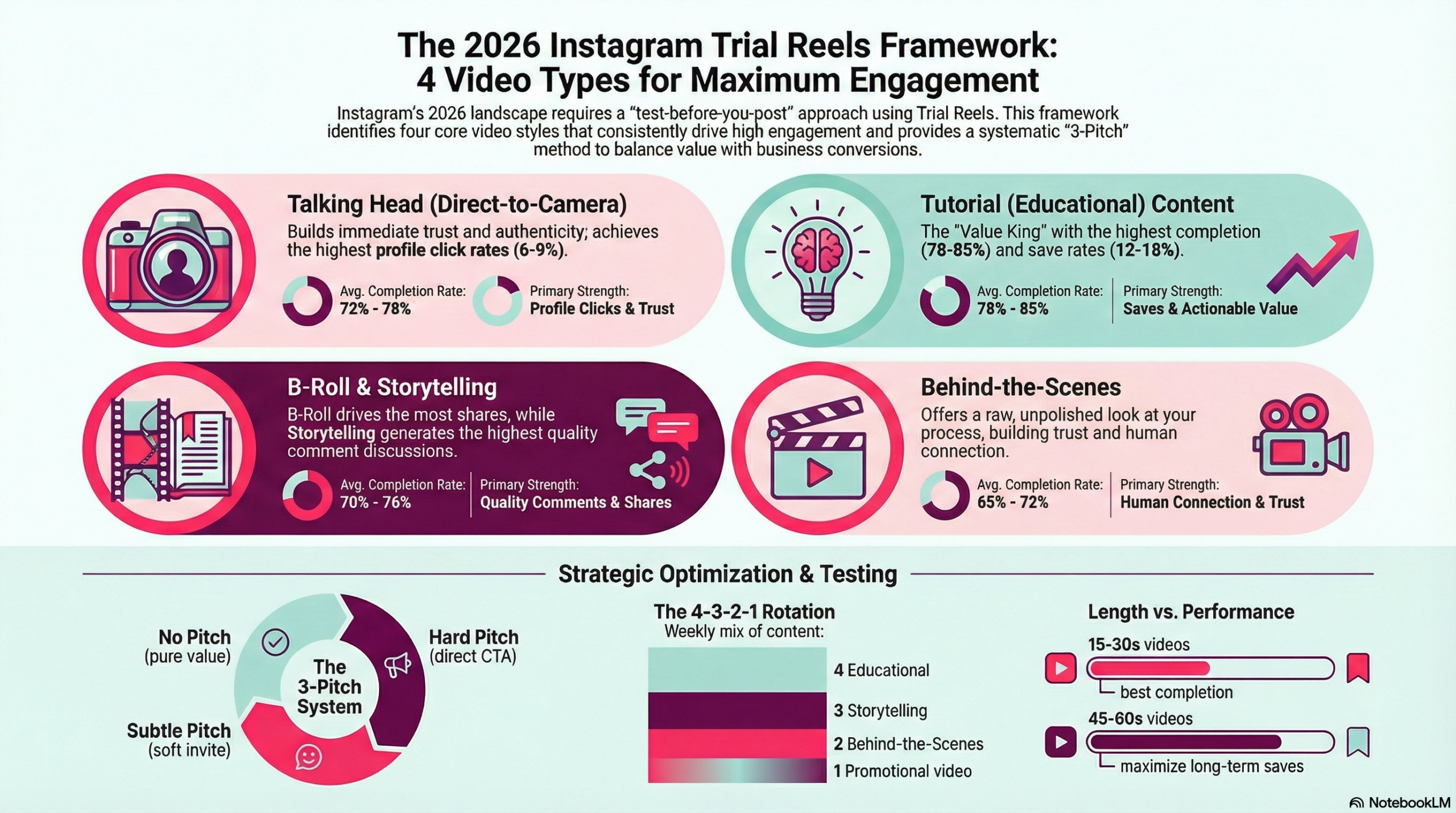
  • Average completion rate: 72-78% across industries
  • Save rate: 8-12% for value-driven content
  • Profile click rate: 6-9% (highest among all video types)

Talking Head Video Optimization for Trial Reels:

Hook Structure (First 3 Seconds): The opening of your talking head video determines whether viewers continue watching. Based on Trial Reels testing data, these hook types consistently perform best:

  1. Question Hooks: “Have you ever wondered why [specific problem]?”
  2. Problem Statement Hooks: “If you’re struggling with [specific issue]…”
  3. Contrarian Hooks: “Everyone tells you to [common advice], but here’s why that’s wrong…”
  4. Authority Hooks: “After [time period] doing [activity], here’s what I learned…”
  5. Story Hooks: “Last week something happened that changed how I think about [topic]…”

Content Structure (4-25 seconds):

  • Value Delivery: Provide specific, actionable insight
  • Personal Experience: Share relevant expertise or story
  • Clear Explanation: Make complex topics understandable
  • Emotional Connection: Show personality and authenticity

The 3-Pitch System for Talking Head Videos:

No Pitch Talking Head Videos: Pure value delivery with no promotional content or call-to-action. These videos build trust and establish expertise without any sales pressure.

Example Structure:

  • Hook: “The biggest mistake I see businesses making with social media…”
  • Content: Share specific mistake and solution
  • Close: “Hope this helps!” (no CTA)

Trial Reels Performance: Highest completion rates (75-82%) but lower conversion rates. Use these to build audience relationship and trust.

Subtle Pitch Talking Head Videos: Valuable content with a gentle invitation to learn more or connect further.

Example Structure:

  • Hook: “Here’s the strategy that doubled our client’s Instagram engagement…”
  • Content: Share high-level strategy overview
  • Close: “DM me ‘STRATEGY’ if you want the complete playbook”

Trial Reels Performance: Balanced completion (68-75%) with moderate conversion rates. Ideal for nurturing audience toward your services.

Hard Pitch Talking Head Videos: Direct promotional content that clearly presents your offer and call-to-action.

Example Structure:

  • Hook: “If you’re ready to stop guessing about your Instagram strategy…”
  • Content: Present specific problem and your solution
  • Close: “Link in bio to book a strategy call this week”

Trial Reels Performance: Lower completion rates (55-65%) but higher conversion rates. Use when you have established audience trust.

Talking Head Video Technical Best Practices:

Lighting and Setup:

  • Natural lighting facing a window or professional ring light
  • Eye-level camera positioning for authentic connection
  • Clean, undistracting background that reflects your brand
  • High-quality audio (external microphone recommended)

Delivery Techniques:

  • Speak directly to the camera as if talking to one person
  • Use natural hand gestures and facial expressions
  • Maintain consistent energy throughout the video
  • Practice key talking points but avoid over-scripting

Video Type #2: B-Roll Videos (Lifestyle and Behind-the-Scenes)

What They Are: Visually-driven videos using lifestyle footage, behind-the-scenes content, or aesthetic visuals with text overlays or voiceovers to tell your story and deliver value.

Why They Work: B-roll videos perform excellently in Trial Reels because they combine visual appeal with strategic messaging. The aesthetic element captures attention while text overlays or voiceovers deliver value efficiently.

Trial Reels Performance Data:

  • Average completion rate: 69-74% across industries
  • Save rate: 6-10% depending on value delivery
  • Share rate: 4-7% (highest among all video types)

B-Roll Video Categories for Instagram Trial Reels:

Behind-the-Scenes B-Roll: Show your actual work process, workspace, or daily routine to build familiarity and trust with your audience.

High-Performing Behind-the-Scenes Concepts:

  • Morning routine or workspace setup
  • Client work process (maintaining confidentiality)
  • Content creation behind-the-scenes
  • Day-in-the-life authentic moments
  • Team collaboration and culture

Lifestyle B-Roll: Aesthetic footage that represents the lifestyle or aspirations connected to your brand or expertise.

Effective Lifestyle B-Roll Approaches:

  • Travel content connected to business lessons
  • Home office or workspace aesthetics
  • Lifestyle moments that reinforce brand values
  • Seasonal content that ties to business themes
  • Personal interests that humanize your brand

Process Documentation B-Roll: Visual documentation of step-by-step processes, transformations, or before-and-after scenarios.

Process Documentation Ideas:

  • Workspace organization or setup
  • Project completion timelines
  • Skill development progression
  • Client transformation journeys (with permission)
  • Business growth milestones

B-Roll Video Text Overlay Strategy:

Text Overlay Best Practices:

  • Use high-contrast colors for readability
  • Keep text on screen for 2-3 seconds minimum
  • Maximum 7 words per text overlay
  • Use consistent font styling throughout video
  • Position text in upper or lower third of frame

Effective Text Overlay Formulas:

Problem-Solution Format:

  • Slide 1: “The problem with [common approach]”
  • Slide 2: “Why this happens [explanation]”
  • Slide 3: “Here’s what works instead [solution]”
  • Slide 4: “The result? [outcome]”

List Format:

  • Slide 1: “3 things I learned from [experience]”
  • Slide 2: “1. [First insight with explanation]”
  • Slide 3: “2. [Second insight with explanation]”
  • Slide 4: “3. [Third insight with takeaway]”

The 3-Pitch System for B-Roll Videos:

No Pitch B-Roll Videos: Focus entirely on providing value, building familiarity, or sharing insights without any promotional elements.

Example: Behind-the-Scenes No Pitch

  • Visual: Morning coffee and workspace setup
  • Text: “How I structure my most productive days”
  • Content: Share actual daily routine insights
  • Close: No call-to-action, pure value sharing

Subtle Pitch B-Roll Videos: Combine valuable content with gentle mentions of your services or expertise.

Example: Process Documentation Subtle Pitch

  • Visual: Client work process (anonymized)
  • Text: “The strategy framework that transformed this client’s results”
  • Content: High-level process overview
  • Close: “Link in bio for more client success stories”

Hard Pitch B-Roll Videos: Use aesthetic visuals to present clear promotional messages and direct calls-to-action.

Example: Lifestyle Hard Pitch

  • Visual: Professional lifestyle moments
  • Text: “Ready to build the business that funds this lifestyle?”
  • Content: Clear connection between service and outcome
  • Close: “DM ‘READY’ to start your transformation”

Video Type #3: Tutorial Videos (Educational and How-To Content)

What They Are: Step-by-step instructional videos that teach specific skills, processes, or concepts to help your audience achieve particular outcomes.

Why They Excel in Trial Reels: Educational content consistently shows the highest performance metrics in Trial Reels testing because it provides immediate, actionable value that audiences save for future reference.

Trial Reels Performance Data:

  • Average completion rate: 78-85% (highest among all types)
  • Save rate: 12-18% (significantly above average)
  • Profile click rate: 6-9%
  • Comment engagement: High-quality questions and implementation feedback

Tutorial Video Categories for Instagram Trial Reels:

Quick Tip Tutorials (15-30 seconds): Concise, actionable advice that viewers can implement immediately.

High-Performing Quick Tip Concepts:

  • “The 30-second fix for [common problem]”
  • “One simple change that [specific benefit]”
  • “The fastest way to [achieve outcome]”
  • “What I wish I knew about [topic] before [situation]”

Process Breakdown Tutorials (30-60 seconds): Step-by-step walkthroughs of specific processes or methodologies.

Effective Process Tutorial Structures:

  • “My 3-step system for [achieving result]”
  • “How to [accomplish task] in [time frame]”
  • “The exact process I use to [specific outcome]”
  • “Step-by-step: [complex process] simplified”

Tool or Software Tutorials (20-45 seconds): Demonstrations of how to use specific tools, apps, or software for better results.

Tool Tutorial Approaches:

  • “How I use [tool] to [achieve result]”
  • “[Tool] features most people miss”
  • “The [tool] workflow that saves me [time/money]”
  • “[Tool] vs [alternative]: which is better?”

Tutorial Video Script Structure for Trial Reels:

Opening Hook (2-3 seconds):

  • “Here’s exactly how to [achieve specific outcome]”
  • “The [tool/method] technique that [specific benefit]”
  • “Stop [doing wrong thing], do this instead”

Value Delivery (15-50 seconds):

  • Step 1: [Specific action with brief explanation]
  • Step 2: [Next action with key insight]
  • Step 3: [Final step with expected outcome]

Reinforcement Close (2-5 seconds):

  • “Try this and let me know how it works!”
  • “Save this for when you need to [situation]”
  • “Which step do you find most challenging?”

The 3-Pitch System for Tutorial Videos:

No Pitch Tutorial Videos: Complete, actionable tutorials with no promotional content. These build maximum trust and authority.

Example: Complete Process No Pitch

  • Hook: “How to audit your Instagram performance in 5 minutes”
  • Content: Complete step-by-step process with specific tools
  • Close: “Hope this helps improve your strategy!”

Trial Reels Performance: Highest save rates and completion rates. Use to establish expertise and build audience trust.

Subtle Pitch Tutorial Videos: Provide partial solution with invitation to get complete methodology or additional resources.

Example: Partial Process Subtle Pitch

  • Hook: “The Instagram audit process that transformed our clients’ results”
  • Content: Share 2-3 key steps of a larger process
  • Close: “DM ‘AUDIT’ for the complete 12-step checklist”

Trial Reels Performance: Strong engagement with moderate conversion rates. Ideal for lead generation and audience building.

Hard Pitch Tutorial Videos: Teach the concept or importance, then direct to your service or product for implementation.

Example: Concept-to-Sale Hard Pitch

  • Hook: “Why most Instagram audits miss the crucial element”
  • Content: Explain what most people miss and why it matters
  • Close: “Ready for a complete audit? Link in bio to book your strategy session”

Trial Reels Performance: Lower completion rates but higher conversion rates. Use when audience understands your expertise.

Video Type #4: Storytelling Videos (Emotional and Relatable)

What They Are: Narrative-driven videos that use personal experiences, client stories, or relatable scenarios to create emotional connection and illustrate important points or lessons.

Why They Work in Trial Reels: Storytelling videos generate high engagement because they create emotional investment. Viewers want to know how stories conclude, leading to strong completion rates and meaningful comments.

Trial Reels Performance Data:

  • Average completion rate: 70-76%
  • Comment engagement: Highest quality responses and discussions
  • Share rate: 5-8% when stories are universally relatable
  • Emotional connection: Strongest brand affinity building

Storytelling Video Categories for Instagram Trial Reels:

Personal Experience Stories: Share your own experiences, failures, successes, or learning moments that provide value to your audience.

High-Impact Personal Story Themes:

  • Failure or mistake that taught important lesson
  • Breakthrough moment that changed your approach
  • Behind-the-scenes struggle that humanizes your journey
  • Unexpected discovery that benefited your business
  • Client interaction that shifted your perspective

Client Success Stories (with permission): Document client transformations, challenges overcome, or results achieved through your work or advice.

Client Story Structures:

  • “When [client] came to us, they were [situation]”
  • “Here’s the exact strategy we implemented…”
  • “The results after [timeframe] were [specific outcomes]”
  • “What this taught us about [broader lesson]”

Relatable Scenario Stories: Create fictional but realistic scenarios that your audience commonly experiences.

Relatable Scenario Approaches:

  • “We’ve all been in this situation…”
  • “Picture this: it’s Monday morning and…”
  • “Every [your audience] has experienced this…”
  • “The conversation every [profession] dreads…”

Storytelling Video Script Structure:

Story Hook (3-5 seconds):

  • “Last month, something happened that completely changed how I…”
  • “I’ll never forget the day a client said this to me…”
  • “This might sound crazy, but hear me out…”
  • “Two years ago, I made a mistake that taught me…”

Story Development (20-45 seconds):

  • Set the scene with specific details
  • Introduce the conflict, challenge, or turning point
  • Build emotional investment through relatable elements
  • Include dialogue or specific actions when relevant

Lesson and Application (5-10 seconds):

  • Extract the universal lesson from your specific story
  • Connect the lesson to your audience’s situation
  • Provide actionable takeaway or perspective shift
  • Close with invitation for audience to share their experiences

The 3-Pitch System for Storytelling Videos:

No Pitch Storytelling Videos: Share complete stories with valuable lessons but no promotional content.

Example: Personal Experience No Pitch

  • Story: Failure that led to important business insight
  • Lesson: What this taught about customer communication
  • Close: “Have you experienced something similar?”

Trial Reels Performance: High emotional engagement and discussion generation. Builds strong audience connection.

Subtle Pitch Storytelling Videos: Let your services naturally emerge from the story’s context or lesson.

Example: Client Success Subtle Pitch

  • Story: How client overcame specific challenge
  • Lesson: The strategy or approach that made the difference
  • Close: “If you’re facing similar challenges, I’d love to help”

Trial Reels Performance: Strong relatability with gentle conversion opportunity. Effective for service-based businesses.

Hard Pitch Storytelling Videos: Use compelling stories to directly illustrate the value of your services or products.

Example: Transformation Hard Pitch

  • Story: Dramatic client or personal transformation
  • Lesson: The specific methodology or service that created results
  • Close: “Ready for your transformation? Link in bio to get started”

Trial Reels Performance: High emotional impact with clear conversion path. Use when story directly connects to your offer.

  •  
The 2026 Instagram Trial Reels Framework infographic showing 4 video content types for maximum engagement: Talking Head videos (72-78% completion rate), Tutorial Educational content (78-85% completion rate), B-Roll Storytelling (70-76% completion rate), and Behind-the-Scenes content (65-72% completion rate). Includes 3-Pitch System strategy, 4-3-2-1 rotation schedule, and video length optimization guidelines.

Advanced Instagram Video Content Strategy

Strategic Video Type Rotation for Maximum Engagement

The 4-3-2-1 Content Rotation System:

Based on Trial Reels performance data, this rotation system optimizes for both audience engagement and business results:

Week 1:

  • 4 Educational videos (high value, authority building)
  • 3 Personal/storytelling videos (connection building)
  • 2 Behind-the-scenes videos (familiarity)
  • 1 Direct promotional video (conversion)

Why This Rotation Works:

  • Educational content establishes expertise and generates saves
  • Personal content builds emotional connection and trust
  • Behind-the-scenes content humanizes your brand
  • Strategic promotion capitalizes on trust and authority built through other content

Video Length Optimization for Trial Reels

Performance by Video Length:

15-30 Second Videos:

  • Best completion rates (75-82%)
  • Moderate save rates (8-12%)
  • Ideal for quick tips, simple tutorials, direct messages
  • Highest performance in Trial Reels testing

30-45 Second Videos:

  • Balanced performance (68-75% completion)
  • Higher save rates (10-15%)
  • Best for process demonstrations, story-driven content
  • Strong overall performance across metrics

45-60 Second Videos:

  • Lower completion rates (58-65%)
  • Highest save rates (15-20%)
  • Best for comprehensive tutorials, detailed stories
  • Use selectively for high-value content

Key Insight: For Trial Reels testing, 15-30 second videos provide the best balance of completion rate and engagement, making them ideal for testing new concepts and approaches.

Seasonal Video Content Strategy

January-March (Planning and Goal Setting):

  • Educational content about planning and strategy
  • Personal transformation or goal-setting stories
  • Behind-the-scenes content showing preparation
  • Tutorial content for skill development

April-June (Implementation and Growth):

  • Process-focused educational content
  • Progress update storytelling
  • Behind-the-scenes work and implementation
  • Tutorial content for optimization

July-September (Results and Reflection):

  • Results-focused storytelling
  • Behind-the-scenes success celebrations
  • Educational content about lessons learned
  • Tutorial content for scaling

October-December (Planning and Preparation):

  • Year-end reflection storytelling
  • Planning-focused educational content
  • Behind-the-scenes preparation for next year
  • Tutorial content for strategic planning

Instagram Video Content Technical Optimization

Video Quality Standards for Trial Reels

Technical Requirements:

  • Minimum 1080p resolution (1920×1080)
  • 9:16 aspect ratio for optimal mobile viewing
  • Clear, high-quality audio (external microphone recommended)
  • Consistent lighting throughout video
  • Stable footage (tripod or gimbal recommended)

Editing Best Practices:

  • Quick cuts every 3-5 seconds to maintain attention
  • Text overlay timing: minimum 2 seconds on screen
  • Captions for accessibility and silent viewing
  • Consistent color grading and visual style
  • Engaging opening frame to stop scrolling

Hashtag Strategy for Video Content

Hashtag Mix for Video Posts (Maximum 5):

Since Instagram now limits hashtags to 5 per post, strategic selection is crucial:

  • 2 niche-specific hashtags (#instagramstrategy, #contentmarketing)
  • 2 broader category hashtags (#digitalmarketing, #videomarketing)
  • 1 community or branded hashtag (#smallbusiness or your branded hashtag)

Video-Specific Hashtag Options:

  • #reels, #instagramreels, #videomarketing
  • #tutorial, #howto (for educational content)
  • #behindthescenes, #bts (for B-roll content)
  • #storytime, #businesstips (for storytelling content)

Strategic Hashtag Selection: With only 5 hashtags available, focus on:

  • High relevance to your specific content
  • Mix of competition levels (2-3 moderate competition, 1-2 lower competition)
  • Audience alignment with hashtags your ideal followers actually search
  • Content type specificity rather than generic tags

Example 5-Hashtag Sets:

For Educational Content: #instagramstrategy #contentmarketing #digitalmarketing #tutorial #smallbusiness

For Behind-the-Scenes Content: #behindthescenes #entrepreneur #contentcreator #businessowner #videomarketing

For Storytelling Content: #storytime #businesstips #entrepreneur #lessons #growth

Caption Strategy for Video Content

Caption Structure for Video Posts:

Hook Line (First Sentence): Grab attention and encourage viewing the video. Use curiosity, questions, or bold statements.

Video Context (2-3 sentences): Provide additional context, backstory, or deeper explanation of the video content.

Call-to-Action: Clear next step for engagement – ask questions, encourage saves, request comments.

Hashtags: Include max of 5  strategic hashtags at the end of the caption.

Performance Metrics and Optimization

Key Video Content Metrics to Track

Primary Metrics (Most Important):

  1. Completion Rate: Percentage of viewers who watch entire video
  2. Save Rate: Percentage who save video for later reference
  3. Share Rate: Percentage who share video with others
  4. Comment Quality: Meaningful engagement vs. superficial reactions

Secondary Metrics: 5. Profile Clicks: Viewers interested in learning more about you 6. Reach Rate: How far beyond your followers the content spreads 7. Replay Rate: Viewers who watch video multiple times

Video Content A/B Testing Strategy

Testing Variables for Video Content:

Hook Testing:

  • Question hooks vs. statement hooks
  • Personal vs. universal hooks
  • Problem-focused vs. solution-focused hooks
  • Direct vs. story-based hooks

Length Testing:

  • 15-second vs. 30-second versions of same content
  • Single concept vs. multiple concept videos
  • Quick tip vs. detailed explanation approaches

Visual Style Testing:

  • Face-to-camera vs. text overlay
  • Static vs. dynamic visual elements
  • Professional vs. casual presentation style
  • Minimalist vs. detailed backgrounds

Content Angle Testing:

  • Beginner vs. advanced positioning
  • Individual vs. business-focused advice
  • Tactical vs. strategic perspectives
  • Problem vs. opportunity framing

Industry-Specific Video Content Strategies

B2B Professional Services

Highest-Performing Video Types:

  1. Educational tutorials (85% avg completion rate)
  2. Behind-the-scenes process videos (78% completion rate)
  3. Client success storytelling (72% completion rate)
  4. Direct expertise talking heads (74% completion rate)

Content Themes That Work:

  • Industry insights and trend analysis
  • Process optimization tutorials
  • Client transformation stories
  • Professional development advice
  • Tool and software demonstrations

E-commerce and Product-Based Businesses

Highest-Performing Video Types:

  1. Product demonstration tutorials (82% avg completion rate)
  2. Behind-the-scenes creation/packaging (76% completion rate)
  3. Customer success storytelling (71% completion rate)
  4. Direct product presentation talking heads (68% completion rate)

Content Themes That Work:

  • Product usage tutorials and tips
  • Behind-the-scenes creation or sourcing
  • Customer transformation stories
  • Seasonal product showcases
  • Comparison and review content

Personal Brands and Coaches

Highest-Performing Video Types:

  1. Personal experience storytelling (79% avg completion rate)
  2. Educational transformation tutorials (81% completion rate)
  3. Behind-the-scenes lifestyle content (73% completion rate)
  4. Direct motivational talking heads (71% completion rate)

Content Themes That Work:

  • Personal transformation journeys
  • Client breakthrough stories
  • Daily routine and lifestyle content
  • Mindset and motivation advice
  • Skill development tutorials

Building Your Instagram Video Content System

30-Day Video Content Implementation Plan

Week 1: Foundation and Testing

  • Day 1-2: Create content calendar based on 4-type framework
  • Day 3-7: Create and test 5 different video concepts using Trial Reels
  • Focus: Establish baseline performance for each video type

Week 2: Optimization and Refinement

  • Day 8-14: Analyze Week 1 Trial Reels data
  • Create variations of best-performing concepts
  • Test different hooks and lengths for top performers
  • Focus: Optimize individual video elements

Week 3: Pitch Variation Testing

  • Day 15-21: Test no pitch, subtle pitch, and hard pitch versions
  • Analyze conversion rates and engagement quality
  • Identify optimal pitch frequency for your audience
  • Focus: Balance value and promotion effectively

Week 4: System Integration and Scaling

  • Day 22-30: Develop sustainable creation workflow
  • Create templates for each successful video type
  • Plan content calendar for following month
  • Focus: Build repeatable, efficient system

Video Content Creation Workflow

Pre-Production (20% of time):

  • Content planning and scripting
  • Location and equipment setup
  • Visual element preparation
  • Trial Reels testing strategy

Production (40% of time):

  • Video recording with multiple takes
  • Various angle and setup options
  • B-roll footage capture
  • Audio quality verification

Post-Production (40% of time):

  • Video editing and optimization
  • Text overlay and caption creation
  • Hashtag research and implementation
  • Trial Reels testing and analysis

Long-Term Video Content Strategy

Month 1-3: Foundation Building Establish your video content types, test extensively with Trial Reels, and identify what works for your specific audience and business goals.

Month 4-6: Optimization and Scaling Refine successful formats, create templates for efficient production, and scale successful content approaches across other platforms.

Month 7-12: Advanced Strategy Integration Integrate video content with broader marketing strategy, develop signature content series, and use video content to drive specific business outcomes.

Measuring ROI and Business Impact

Direct Business Metrics

Lead Generation Tracking:

  • Profile clicks from video content
  • DM inquiries generated by videos
  • Email signups attributed to video CTAs
  • Consultation bookings from video content

Sales and Revenue Tracking:

  • Client acquisitions traced to video content
  • Product sales from video demonstrations
  • Service bookings from educational videos
  • Long-term customer value from video-generated leads

Brand Awareness Metrics:

  • Follower growth rate from video content
  • Share and save rates indicating content value
  • Mention increase in comments and DMs
  • Cross-platform engagement and recognition

Content Performance Analysis

Monthly Video Content Review:

  • Top-performing video types by engagement
  • Conversion rates by video category
  • Audience feedback and comment analysis
  • Technical performance metrics

Quarterly Strategy Assessment:

  • Overall business impact from video content
  • ROI calculation for time and resources invested
  • Competitive analysis and market position
  • Strategy adjustments for next quarter

Advanced Strategies and Future Considerations

Cross-Platform Video Content Strategy

Repurposing Video Content:

  • Adapt Instagram videos for LinkedIn, TikTok, YouTube Shorts
  • Create longer-form versions for YouTube or podcast content
  • Extract key quotes and insights for Twitter/X content
  • Develop email newsletter content from video themes

Platform-Specific Optimization:

  • Adjust video length and format for each platform
  • Modify captions and hashtags for platform culture
  • Test different posting times and frequencies
  • Analyze cross-platform performance correlations

Emerging Video Content Trends

2026 Video Content Predictions:

  • Increased importance of educational content over entertainment
  • Growing demand for behind-the-scenes authenticity
  • Rising value of data-driven content optimization
  • Greater emphasis on accessibility and inclusivity

Technology Integration:

  • AI-assisted video editing and optimization tools
  • Advanced analytics for content performance prediction
  • Automated A/B testing for video elements
  • Enhanced accessibility features and capabilities

Conclusion: Building Your Video Content Success Framework

Instagram video content success isn’t about creating more content, it’s about creating the right content systematically and testing it strategically before committing your time and audience attention.

The four-type video content framework provides a strategic foundation for consistent Instagram growth:

Educational videos establish your expertise and generate the highest save rates, building long-term authority and trust with your audience.

Behind-the-scenes videos humanize your brand and create familiarity, making your audience feel connected to your journey and process.

Direct talking head videos build personal connection and trust, allowing you to communicate directly with your audience and establish authentic relationships.

Storytelling videos create emotional connection and memorability, helping your message resonate and stick with viewers long after they’ve watched your content.

By rotating through these four video types and varying your promotional approach using the no pitch, subtle pitch, and hard pitch system, you create a sustainable content strategy that builds audience trust while driving business results.

The key is systematic testing through Instagram Trial Reels. Instead of guessing what will work, you can test different video approaches, analyze performance data, and make informed decisions about what content to promote to your main audience.

Ready to implement this video content framework? Start by choosing one video type that feels most natural for your expertise and audience, create three variations with different pitch levels, and test them through Instagram Trial Reels. Use the performance data to refine your approach and gradually incorporate the other video types into your content strategy.

Want help implementing a comprehensive Instagram video content strategy? Our Instagram Trial Reels Viral Framework service helps businesses systematically test and optimize their video content for maximum engagement and conversion. Contact our team to discuss how we can help you build a data-driven video content system that consistently drives business results.

For more advanced Instagram strategies, explore our comprehensive guides:


What to Post and Why for Conversions on Social Media

What to Post (and Why) for Conversions on Social Media

If you’re posting consistently but still not getting the results you want, the problem isn’t how often you post, it’s what you’re posting and why.

The goal of social media isn’t just visibility. It’s trust, connection, and conversion. And that starts with understanding your content style, your audience, and your strategy

Identify Your Social Media Commitment Level

Before you build a content plan, you need to be honest about how much time, energy, and support you have. There’s no one-size-fits-all approach, and your strategy should reflect your current season of business.

Here are the four core levels of content commitment:

what to post and why, content schedule, output of social media levels

Reminder: You can stay in Light mode and still grow. Just make sure your content is intentional and strategic.

The Four Content Types That Drive Results

No matter how often you post, your content should serve one of four core purposes.

  1. Credibility Content
    This builds trust. Share results, testimonials, transformations, case studies, or behind-the-scenes work that demonstrates your authority and outcomes.
  2. Connection Content
    This builds rapport. Share personal stories, values, experiences, or moments that show your human side and help your audience relate to you.
  3. Educational Content
    This builds authority. Offer tips, how-tos, breakdowns, and insights that help your audience solve small problems and see you as the expert.
  4. Conversion Content
    This drives action. Share clear calls to action, booking opportunities, or prompts to take the next step. Be direct, not pushy.

Each piece of content should move someone closer to working with you. If it doesn’t serve one of these purposes, it’s just noise.

4 types of content that actually covert

Suggested Weekly Content Mix

Match your posting level to the right mix of content types for maximum results.

Light (2–3 posts/week):
1 credibility, 1 connection, 1 educational

Moderate (4–5 posts/week):
1–2 educational, 1 connection, 1 credibility, 1 conversion

Aggressive (daily):
Even mix of all four types, rotating throughout the week

Obsessed (multiple daily):
Cycle through all content types every two to three days, repurposing across platforms

Take Action With Strategy

Once you know your content level and structure, put systems in place to support it.

  • Download a 90-day content planner to map your strategy

  • Use a framework like StoryBrand to clarify your messaging

  • Study carousel and reel strategies that increase engagement

  • Avoid engagement bait or algorithm triggers that limit reach
Content Mix to post, social media posting level and mix

Final Thoughts

Content without a strategy is just noise. Your audience doesn’t need more from you. They need content that is intentional, relevant, and built to convert.

Decide your level. Choose your mix. Create with purpose.


Facebook
Twitter
LinkedIn
Email
Tumblr
Print